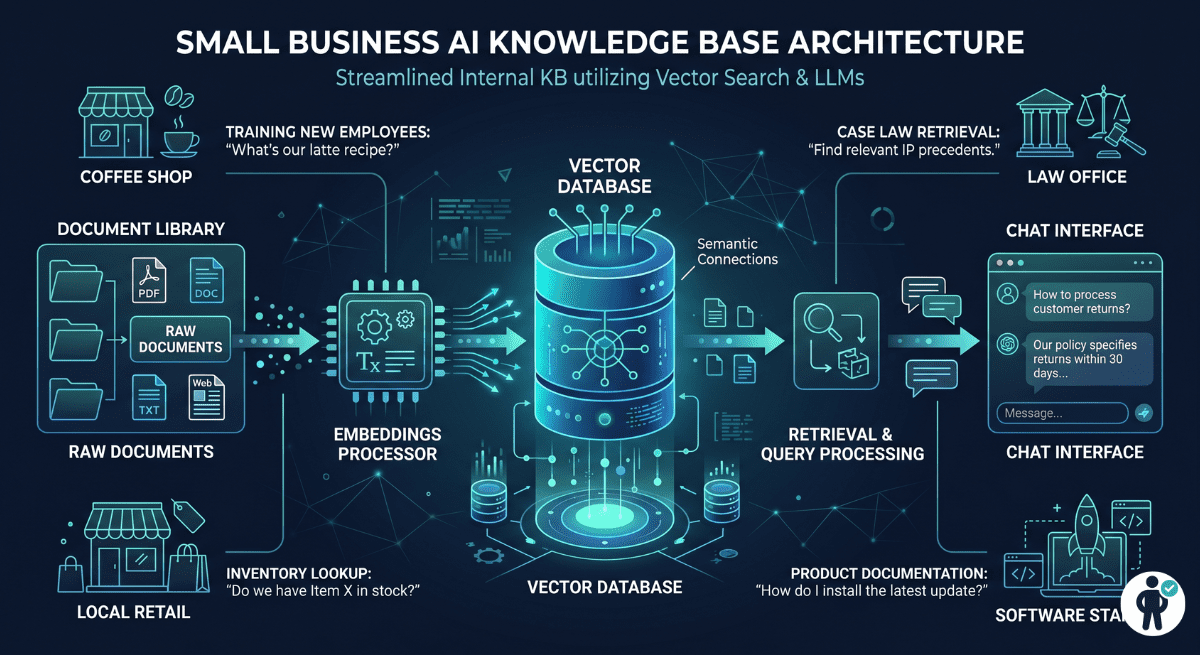
Introduction: Why Small Businesses Need a Vector Database for RAG
Retrieval-Augmented Generation — RAG — is the architecture that lets an AI model answer questions from your specific business data rather than just its training knowledge. A customer support bot that knows your actual product documentation. An internal assistant that can search five years of company policies. A document search tool that understands meaning rather than just matching keywords. All of these are RAG applications, and they all require one foundational component: a vector database.
A vector database stores the mathematical representations (embeddings) of your documents and retrieves the most semantically similar ones when a user asks a question. Without it, you are limited to keyword search — which fails on synonym variations, paraphrased questions, and conceptual queries that do not contain the exact words from your documents.
The challenge for small businesses is that the vector database landscape is littered with enterprise-scale solutions, confusing pricing models, and infrastructure complexity that only makes sense if you have a full DevOps team. This guide is written for the opposite situation: small teams who need a working RAG system, not a vector database PhD. We rank six options by what matters for you — setup time, monthly cost, hidden billing risks, and the operational burden of keeping it running.
What Small Businesses Need in a RAG Stack
Before comparing tools, it is worth being explicit about what a small business RAG stack actually requires versus what enterprise vector database marketing suggests you need.
Easy setup: You should be able to get from zero to first retrieval in under four hours without reading a 200-page operations manual. Tools that require Kubernetes, custom network configuration, or three days of tuning before delivering useful results are the wrong tools for this context.
Predictable, low cost: The most dangerous billing model for small businesses is usage-based pricing without caps. A vector database that costs $50/month during your prototype phase and $2,800/month three months later — on the same dataset — is not a small business tool. We will quantify this risk explicitly for each option.
Hybrid search: Pure vector similarity search misses on short queries, proper nouns, and product codes. A stack that combines vector search (for semantic similarity) with keyword search (for exact matching) delivers materially better results for most business use cases.
Metadata filtering: Almost every real RAG application needs to filter results before or during retrieval — by department, by date range, by document type, by customer ID. How a database handles this filtering has enormous implications for both retrieval quality and query cost.
Scale ceiling awareness: Most small businesses will never exceed 5 million vectors. Choosing a database designed for 10 billion vectors because it appears on more enterprise comparison lists is a common and expensive mistake.
Best Vector Databases for Small Business RAG in 2026
The right choice depends primarily on three variables: your existing infrastructure (are you already on PostgreSQL?), your technical capacity (do you have a developer who can manage a self-hosted service?), and your expected query volume (will you hit the serverless scale cliff?). The recommendations below address each scenario directly.
#1 Pinecone — Best Managed Option for Non-Infrastructure Teams
Paid: ~$0.04/1M reads + storage
Pinecone Serverless is the easiest path to a production vector database for teams with no infrastructure experience. You create an index, get an API key, and start upserting vectors within 10 minutes. There is no server to manage, no scaling to configure, and no maintenance window to plan around. For low-to-moderate query volumes, it is genuinely the fastest way to get a RAG application into production.
✅ Strengths
- Zero-ops managed — no servers, no maintenance
- Scales to zero — pay nothing when idle
- Excellent documentation and client SDKs
- Free tier generous for prototyping
- Sub-100ms query latency at moderate scale
❌ Limitations
- Usage-based pricing bites at high QIR (see Scale Cliff below)
- Post-filtering only — recall drops on selective queries
- No hybrid BM25 + vector search natively
- Vendor lock-in — migration is non-trivial
A small business RAG app with 5,000 queries/month, a 2GB namespace, and tenant-specific filtering:
Month 1 (prototype): ~$50/month
Month 3 (production traffic × filtered queries × RU multiplication): $2,400–$2,800/month
The migration trigger: When your Query-to-Ingestion Ratio (QIR) exceeds 100 on a stable dataset, migrate to self-hosted Qdrant on a $20–40/month VPS. You eliminate all per-query fees and reduce infrastructure costs by up to 70%.
The Pinecone Read Unit cost model follows this formula — important to understand before committing at scale:
Qmonth = monthly query count
Snamespace = namespace size in GB (minimum 0.25 applied)
Rrate = Read Units consumed per query (1 standard, 5–10 with selective filtering)
#2 Qdrant — Best Cost-to-Performance for Technical Teams
Cloud: from $25/mo · VPS: $20-40/mo flat
Qdrant is the technically strongest open-source vector database for small businesses with a developer who can manage a single service. Its payload-indexed pre-filtering model solves the most significant retrieval quality problem in RAG at scale — selective metadata queries — while maintaining sub-8ms latency. Self-hosted on a $20–40/month VPS, it eliminates per-query fees entirely and delivers better filtering performance than Pinecone at a fraction of the cost for high-QIR workloads.
✅ Strengths
- Pre-filtering during HNSW traversal — best filtering recall
- 4–8ms latency even with restrictive metadata filters
- Flat-rate self-hosted — zero per-query fees
- Strong multi-tenancy support
- Excellent Rust-based performance
- Free managed tier available
❌ Limitations
- Requires basic DevOps for self-hosted setup
- No built-in BM25 keyword search
- Smaller ecosystem than Pinecone
- Cloud managed option less mature than Pinecone
Pre-Filtering vs Post-Filtering: Why It Matters
This is the technical detail most comparison articles skip, and it directly affects RAG quality for any multi-tenant or document-type-filtered use case:
| Approach | How It Works | Recall Under Selective Filters | Latency | Who Uses It |
|---|---|---|---|---|
| Post-Filtering | Run vector search first, then filter results by metadata | Can return < K results — loses recall | Fast on unfiltered queries | Pinecone (default) |
| Pre-Filtering | Apply metadata index during HNSW graph traversal | Always returns K results — full recall preserved | 4–8ms even with restrictive filters | Qdrant |
For a multi-tenant customer support application where each query must be filtered to a single customer’s documents, post-filtering can silently degrade retrieval quality — returning 2 results when you requested 5, without any error or warning. Pre-filtering eliminates this problem entirely.
#3 Weaviate — Best for Hybrid Search Out of the Box
Serverless cloud from $25/mo
Weaviate’s defining feature is native hybrid search — combining BM25 keyword matching with vector similarity search in a single query, weighted by a configurable alpha parameter. For RAG applications where users ask both conceptual questions (“what is our refund policy?”) and specific factual queries (“what is the SKU for model XR-204?”), hybrid search delivers materially better results than pure vector search. Weaviate also provides a schema system that gives each document type a typed structure, improving query reliability.
✅ Strengths
- Native BM25 + vector hybrid search built-in
- Schema-based document typing
- GraphQL and REST APIs
- Modules for OpenAI, Cohere, HuggingFace embedding
- Active development + good documentation
❌ Limitations
- Higher memory footprint than Qdrant
- Schema definition adds upfront setup complexity
- Cloud pricing less transparent than Pinecone
- Overkill for simple knowledge base use cases
#4 pgvector — Best for PostgreSQL Users (Zero Extra Infrastructure)
Cost = your existing PostgreSQL hosting
pgvector is a PostgreSQL extension that adds vector similarity search to your existing database. If you are already running PostgreSQL for your application data, adding pgvector means your documents, metadata, and vectors all live in the same table — in the same transaction boundary — with no additional infrastructure to manage, monitor, or pay for. For small businesses with under 5 million vectors and moderate query volumes, this is often the correct default choice and the one most comparison articles under-recommend.
✅ Strengths
- Zero additional infrastructure — uses existing Postgres
- Full SQL filtering — all your metadata is co-located
- Transactional consistency with your application data
- No migration complexity — no data sync required
- Works on Railway, Supabase, Neon, RDS, Heroku
❌ Limitations
- Performance degrades above 5–10M vectors without tuning
- IVFFlat index requires periodic rebuilding
- No native hybrid BM25 (use pg_trgm alongside)
- Not suitable for high-concurrency vector workloads
#5 Chroma — Best for Prototyping and Local MVPs
Cloud: early access pricing
Chroma is designed for the fastest possible path from idea to working RAG demo — pip install chromadb, five lines of Python, and you have a local vector store running. It is the right tool for internal tools, demos, and MVPs where you need to prove the concept before committing to infrastructure. The important caveat: Chroma is not a production database in the traditional sense. It lacks the durability guarantees, access controls, and performance characteristics needed for customer-facing production workloads at meaningful scale.
✅ Strengths
- 5-minute setup — runs entirely in Python process
- Excellent for LangChain/LlamaIndex integration
- No infrastructure knowledge required
- Ideal for internal tools and demos
❌ Limitations
- Not production-grade for customer-facing apps
- Limited filtering and query capabilities
- Performance degrades quickly with scale
- Cloud offering still maturing
#6 Milvus — Powerful but Operationally Demanding
Zilliz Cloud: from $65/mo
Milvus is a genuinely impressive high-performance vector database built for billion-scale deployments. For small businesses, it is the wrong tool. The self-hosted deployment requires Kubernetes or Docker Compose with multiple interdependent services (etcd, MinIO, Pulsar), significant infrastructure knowledge to operate, and memory resources that far exceed what a knowledge base with a few hundred thousand vectors requires. Consider Milvus only if you are explicitly planning to scale to tens of millions of vectors in the near term and have dedicated infrastructure capacity.
✅ Strengths
- Billion-scale performance capability
- Rich index type selection (IVF, HNSW, DiskANN)
- Strong enterprise feature set
❌ Limitations for SMBs
- Kubernetes deployment required for full feature set
- 5–10× more operational overhead than Qdrant
- Overkill for under 10M vectors
- Steep learning curve
Comparison Table: All Six Vector Databases Side-by-Side

| Database | Setup | Monthly Cost | Hosting | Hybrid Search | Pre-Filter | Scale Limit (SMB) | Best For |
|---|---|---|---|---|---|---|---|
| Pinecone | ⭐ Easy | $0–$2,800+* | Managed only | ❌ No | ❌ Post-filter | ⚠️ QIR < 100 | Non-technical teams |
| Qdrant | ⚠️ Medium | $20–40 flat VPS | Self-hosted / Cloud | ⚠️ Via plugin | ✅ Pre-filter | ✅ 50M+ vectors | Technical teams |
| Weaviate | ⚠️ Medium | $0–$40 | Self-hosted / Cloud | ✅ BM25 native | ✅ Yes | ✅ 10M+ vectors | Hybrid search needs |
| pgvector | ⭐ Easiest | $0 (add to Postgres) | Your Postgres host | ⚠️ pg_trgm combo | ✅ Full SQL | ⚠️ < 5M vectors | Postgres users |
| Chroma | ⭐ Easiest | $0 local | Local / Cloud beta | ❌ No | ⚠️ Basic | ❌ < 500K vectors | Prototypes / MVPs |
| Milvus | ❌ Hard | $65+ managed | Kubernetes / Cloud | ✅ Yes | ✅ Yes | ✅ Billions | Enterprise / high growth |
*Pinecone cost at production QIR > 100 with selective metadata filtering. See Scale Cliff analysis above.
Which Vector Database Is Best by Use Case
Feature lists help you understand capabilities — this decision matrix helps you choose based on your actual situation.
Already on PostgreSQL (< 5M vectors)
Add pgvector to your existing database. Zero new infrastructure, no data sync complexity, full SQL filtering. Install: CREATE EXTENSION vector;. Done. This is the most underused option in the small business RAG space.
Non-technical team, needs zero-ops setup
Get to production in under a day. Set a billing alert at $100/month immediately. Monitor your QIR monthly. If it exceeds 100 on a stable dataset, plan a migration to self-hosted Qdrant to avoid the Scale Cliff.
High QIR, multi-tenant, or complex filtering
$20–40/month flat rate on DigitalOcean/Hetzner eliminates all per-query fees. Pre-filtering maintains recall quality under restrictive metadata queries. Best long-term cost structure for production RAG apps.
Need BM25 + vector hybrid search
If your users ask both semantic questions and exact-match queries (product codes, names, IDs), hybrid search delivers materially better results. Weaviate’s native BM25 integration is the cleanest in this comparison.
Building an MVP or internal demo
Start here when you need to prove the concept. Five lines of Python. No infrastructure knowledge required. Migrate to pgvector or Qdrant when moving to production — the migration is straightforward since your chunking and embedding logic stays identical.
Small business with < 10M vectors
Milvus is a powerful database solving problems you almost certainly do not have yet. The operational overhead — Kubernetes, multiple interdependent services, dedicated infrastructure knowledge — is not justified for small business scale. Revisit at 50M+ vectors with a dedicated DevOps resource.
True Cost Breakdown: Hidden Costs Beyond Monthly Pricing
The database subscription fee is only one component of your total RAG infrastructure cost. Small businesses consistently underestimate these secondary costs:
| Cost Component | Typical Range | Notes |
|---|---|---|
| Embedding generation (initial) | $0.02–$2 per 10K docs | OpenAI text-embedding-3-small: $0.02/1M tokens. 10K docs × 500 tokens avg = $0.10 total |
| Embedding re-generation (updates) | $0.01–$0.50/month | Only changed documents need re-embedding. Usually negligible. |
| LLM generation costs | $5–$200/month | Often the largest cost. GPT-4o-mini ($0.15/1M input) vs GPT-4o ($2.50/1M input) |
| Vector DB hosting / queries | $0–$2,800/month | $0 (pgvector/Chroma) → $20-40 flat (Qdrant VPS) → usage-based (Pinecone) |
| Developer setup time | 4–40 hours | Chroma/pgvector: 4 hours. Pinecone: 8 hours. Qdrant/Weaviate: 16-24 hours. |
| Monitoring + backups | $5–$20/month | Self-hosted: add Uptime Robot ($7/mo) + automated DB backups. Managed: usually included. |
Performance Factors That Actually Matter for RAG
Retrieval recall — not speed — is the most important performance metric for RAG. A retrieval system that returns the wrong documents in 20ms is worse than one that returns the right documents in 80ms. Recall@K measures what percentage of the time the correct document appears in your top-K retrieved results. For a customer support RAG, a recall@5 below 0.80 means 20% of questions receive answers based on wrong context — a quality problem that latency optimization cannot fix.
Filtering recall is distinct from overall recall and where many small business RAG systems fail silently. When you filter to a subset of documents (by date, tenant, document type), post-filtering systems can return fewer results than requested — and the system does not notify you. If you are building a multi-tenant application, test filtering recall explicitly before going to production.
Index type selection affects both speed and accuracy. HNSW (Hierarchical Navigable Small World) indexes — used by Qdrant and Weaviate — provide the best accuracy-to-speed tradeoff for most RAG workloads. IVFFlat indexes (available in pgvector) are faster to build but less accurate. For small business scale (under 5M vectors), HNSW with default settings outperforms IVFFlat in retrieval quality without meaningful latency difference.
Common Mistakes Small Businesses Make With RAG Databases
Choosing enterprise tooling for small business problems. Milvus and Elasticsearch-based vector solutions appear in enterprise comparison articles and developer conference talks. They are built for problems involving billions of vectors and dedicated infrastructure teams. Starting with them when you have 50,000 documents creates operational overhead that consumes developer time that should go toward building your actual application.
Ignoring metadata schema design. The quality of your RAG application depends as much on your metadata structure as on your vector database choice. If you do not store source_url, created_date, department, and document_type alongside each chunk, you cannot filter search results meaningfully. This is a design decision that needs to happen before you write your first upsert call, not after.
Skipping evaluation. Most small business RAG implementations go directly from “it returns something” to “it’s live.” Without measuring retrieval recall on a sample of real queries, you have no idea whether the system is finding the right context 95% of the time or 60% of the time — and 60% feels like “working” when you are testing it casually. Build a 50-question test set before launching to real users.
The multi-system trap. Choosing a dedicated vector database forces you to maintain synchronization between your relational database (for metadata), your vector database (for embeddings), and potentially a keyword search engine (for hybrid search). For small businesses, this adds three potential failure points and a synchronization complexity that is rarely justified under 5 million vectors. pgvector eliminates this entirely by co-locating all data in PostgreSQL.
Simple Starter Architecture for Small Business RAG
Frequently Asked Questions (FAQ)
What is the best vector database for small business RAG?
For most small businesses, pgvector is the best default choice if you are already on PostgreSQL — it costs nothing extra and eliminates the multi-system synchronization problem entirely. If you are starting fresh without an existing database, Pinecone Serverless provides the fastest path to production with zero infrastructure management. For technical teams expecting growth beyond 5 million vectors, self-hosted Qdrant on a $20–40/month VPS delivers the best long-term cost structure with superior metadata filtering performance. The critical variable is your Query-to-Ingestion Ratio — measure it before committing to a pricing model.
Is pgvector enough for a small business?
Yes — for the vast majority of small businesses with under 5 million vectors, pgvector is not just “enough,” it is often the best architectural choice. It eliminates a separate vector database service entirely, keeps your application data and vectors in the same transaction boundary, supports full SQL metadata filtering without pre/post-filter limitations, and costs nothing beyond your existing PostgreSQL hosting. Performance becomes a genuine concern only above 5–10 million vectors at high query concurrency. Scale to HNSW indexes and proper index tuning before evaluating a migration.
Should I use Pinecone or Qdrant for my small business RAG?
Use Pinecone if: your team has no DevOps capacity, your query volume is low-to-moderate (QIR under 100), and operational simplicity is the priority. Set a billing alert at $100/month immediately. Use Qdrant if: you have a developer who can spin up a VPS, your application needs selective metadata filtering (pre-filtering preserves recall that Pinecone’s post-filtering loses), or you expect query volume to grow to where Pinecone’s per-query billing would cause bill shock. At QIR over 100 on a stable dataset, self-hosted Qdrant on a $20–40/month flat-rate VPS saves 60–70% versus Pinecone.
Do I need a vector database for a small knowledge base?
For under 1,000 documents and low query volume (under 100 queries/day), you can start with Chroma locally and delay the infrastructure decision entirely. For 1,000–50,000 documents, pgvector on your existing PostgreSQL handles the load without additional infrastructure. A dedicated vector database becomes worth the operational complexity only when you exceed 5 million vectors, require multi-tenant isolation with complex filtering, or need hybrid BM25 + vector search for product-code-style exact matching alongside semantic queries.
What is the cheapest way to build RAG for my business?
The minimum-cost complete RAG stack: pgvector on your existing PostgreSQL (free) + OpenAI text-embedding-3-small for embeddings ($0.02/1M tokens — a 10,000-document knowledge base costs approximately $0.10 to embed) + GPT-4o-mini for generation ($0.15/1M input tokens) + a basic Python retrieval script (LangChain has a pgvector integration template). Total infrastructure cost for moderate usage: under $15–20/month. If you do not already have PostgreSQL, Supabase’s free tier includes pgvector and covers most small business scales indefinitely.
Final Recommendation: The Clear Choices for Small Business RAG
For most small businesses: start with pgvector or Pinecone. If you are already on PostgreSQL, install pgvector — this single decision eliminates the multi-system synchronization problem, costs nothing, and handles most small business RAG workloads without additional infrastructure. If you are starting from scratch and want managed simplicity, Pinecone Serverless gets you to production fastest — but set a billing alert at $100/month on day one and monitor your Query-to-Ingestion Ratio monthly.
For technical teams planning to scale: start with Qdrant. The initial setup overhead is a one-time cost. The ongoing benefit — pre-filtering for full retrieval recall under selective metadata queries, flat-rate pricing that does not compound with query volume, and superior performance at moderate-to-high QIR — compounds favorably over time. A self-hosted Qdrant instance on a $20–40/month VPS will handle most small business RAG workloads well into the tens of millions of vectors.