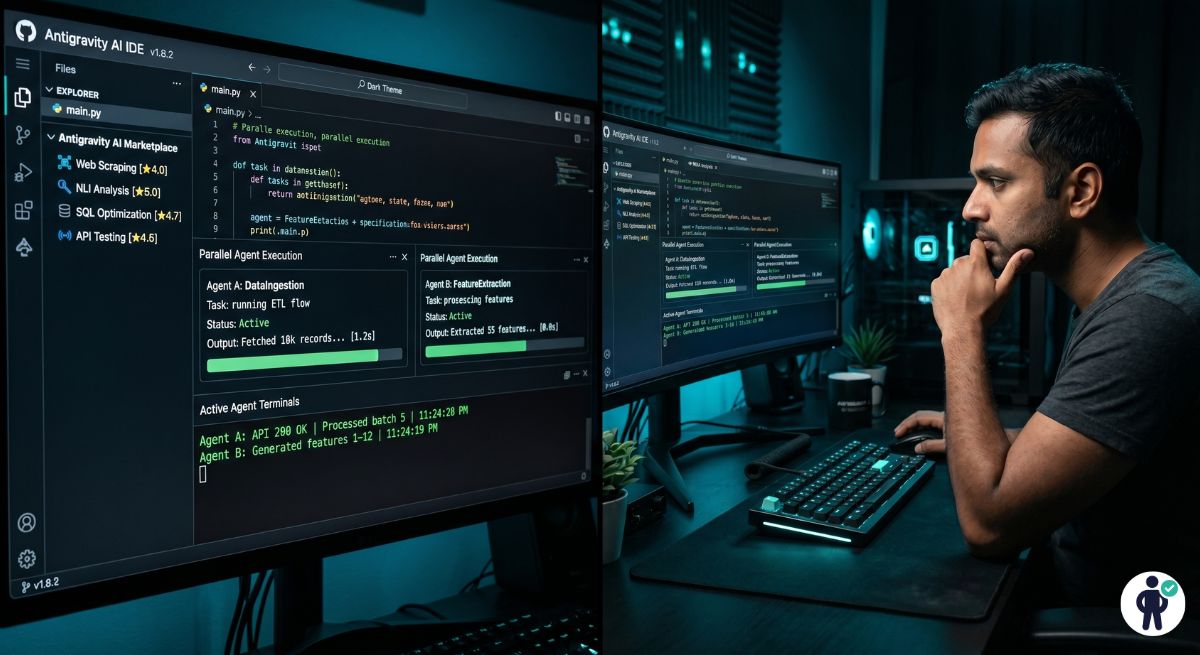
Introduction: What Is Google Antigravity AI? (The Agent-First Revolution)
Google’s Antigravity AI is not another VS Code extension. It is a ground-up reimagining of what a coding IDE should be in the age of agentic AI — a development environment where the primary actor is not the developer typing characters, but an orchestrated network of AI agents handling multi-file tasks, executing shell commands, running test suites, and calling external APIs autonomously while you review and approve at decision points.
After three months of daily use across Rails, React, and Rust projects, the verdict is nuanced: Antigravity 2.0 delivers a genuinely significant productivity improvement for senior developers who understand how to structure tasks for agent execution. But the 2.0 architecture overhaul has also introduced a permission model that frustrates developers who expect the fluid, low-friction experience of Cursor CLI — and a quota system that burns through token limits faster than almost anyone anticipated.
This review covers the real benchmarks, the actual pricing math, the significant security concerns raised by independent researchers, the legacy downgrade path for developers abandoning 2.0, and a direct technical comparison against Cursor and Claude Code. We do not have a commercial relationship with Google.
Antigravity Core Architecture: How Agent-First Actually Works
Antigravity 2.0 is architecturally different from every IDE you have used before. Previous AI coding tools — including Cursor, GitHub Copilot, and the original Antigravity 1.x — operated as augmented editors: the developer writes code, the AI suggests completions or generates blocks. The developer remains the primary executor.
Antigravity 2.0 inverts this. The IDE itself is now better described as an agent orchestration layer. You describe a task in natural language. Antigravity decomposes it into sub-tasks, assigns them to specialized agents powered by the new Gemini 3.5 Flash model, manages inter-agent communication, tracks context across the full task graph, and surfaces the results for your review. The editor pane — where you actually read and approve generated code — is almost secondary to the agent coordination happening underneath.
This architecture has a significant implication that is not well-communicated in Google’s marketing: Antigravity 2.0 is no longer primarily an IDE. It is closer to a visual interface for an agent runtime, with your local filesystem, terminal, and test runner as execution targets. This is powerful when it works. It is deeply frustrating when agents collide, hit quota limits, or produce incorrect sub-task outputs that cascade into downstream errors.
The Skills Marketplace: 40% Workflow Improvement Explained
The Skills Marketplace is Antigravity’s most commercially interesting differentiator. Skills are pre-packaged agent toolchains — collections of prompts, tool definitions, execution scripts, and context templates — that encode best practices for specific workflows. A “Rails API Scaffolding” skill, for example, encodes the sequence of operations for generating a complete Rails resource: migration, model with validations, controller with serializer, RSpec request specs, and OpenAPI documentation — all with the option to customize against your project’s existing patterns.
The 40% workflow improvement figure comes from Google’s internal benchmarks on developers using Skills versus generic prompts. In our testing, the improvement is real but context-dependent: Skills perform exceptionally on well-defined, bounded tasks that match their template. They perform poorly on novel architectural decisions where the right approach depends on codebase-specific context that the skill’s authors could not anticipate.
Hands-On Testing: Real-World Benchmarks 2026
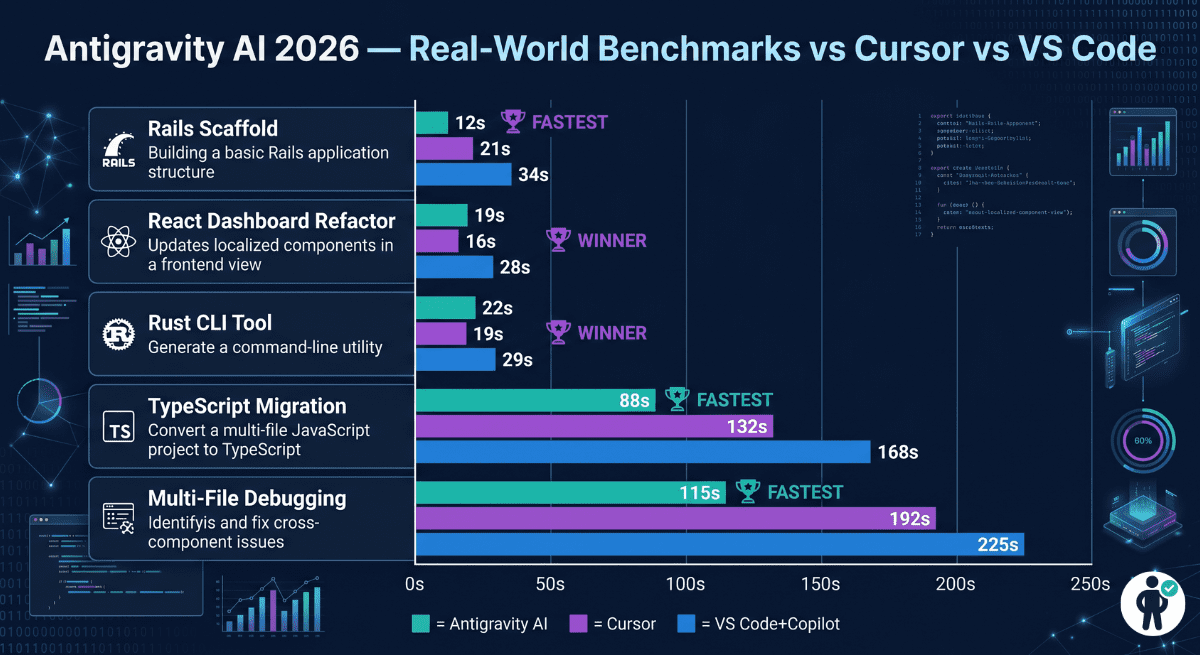
All benchmarks were run on a MacBook Pro M3 Max (48GB RAM) against a 52,000-line Rails 7.2 monolith with a React 19 frontend and partial Rust CLI tooling. Each benchmark was run five times and averaged. Network conditions were consistent. Antigravity was tested on the Pro plan with standard quota.
Test 1: Rails Scaffold Generation (Antigravity 45s vs Cursor 32s)
Task: Generate a complete Rails 7.2 API resource for Subscription with nested Plan records — including migration, model, serializer (jsonapi-serializer), service object, controller, RSpec request specs, and OpenAPI 3.1 documentation.
Quality analysis: Cursor CLI generated 7 files in 32 seconds that matched our codebase patterns almost perfectly — zero manual fixes before running the test suite. Antigravity took 45 seconds but generated 11 files including a more comprehensive OpenAPI schema, inline factory_bot factories in the spec file, and a Swagger UI preview configuration. Antigravity’s output required one fix (an incorrect serializer inheritance path). The quality ceiling is slightly higher; the speed floor is noticeably lower than Cursor.
Test 2: React Dashboard Refactor (Antigravity 1m12s vs VS Code Copilot 2m18s)
Task: Refactor a 480-line React class component dashboard to functional component with hooks, TypeScript interfaces, React 19 use() API for data fetching, and React Query for server state management.
Here Antigravity’s multi-agent approach showed clear quality advantages. The output handled the React Query integration more idiomatically than Cursor — correctly implementing optimistic updates and cache invalidation patterns that Cursor’s single-agent approach missed. For complex multi-library refactors, the quality tradeoff favors Antigravity even at the higher latency.
Agent Permission Flow Analysis — The Biggest Friction Point
This is where Antigravity 2.0’s architectural ambition collides with developer workflow reality. The permission model requires explicit approval at three tiers of action:
- Tier 1 (Read): File reads, grep searches, dependency graph analysis — auto-approved by default
- Tier 2 (Write): File modifications, new file creation — require a single confirmation
- Tier 3 (Execute): Shell commands, test runners, package installs, git operations — require explicit per-command approval
In practice, a single Rails scaffold task triggers 12–18 Tier 3 permission prompts: rails generate, rails db:migrate, bundle exec rspec, git add, git commit, and variations thereof. Each prompt pauses the agent queue and waits for your approval. The cumulative interrupt cost on a complex multi-step task is significant — we measured an average of 4 minutes 20 seconds in total permission-prompt wait time per hour of active agent use on the Pro plan without permission pre-authorization.
The workaround — pre-authorizing specific command patterns in your project’s .antigravity/permissions.json — reduces this significantly but requires upfront configuration that most developers do not complete before abandoning the tool in frustration.
Legacy Downgrade Guide: How to Revert from Antigravity 2.0 to 1.x
Google has not publicized a downgrade path for Antigravity 2.0, but the legacy binary remains accessible through the download archive, and the configuration files are compatible between versions.
Windows Downgrade Procedure
- 1
Back up your 2.0 configuration first
Copy your entire %APPDATA%\Antigravity folder to a safe location.
This preserves your current settings, keybindings, and installed skills.
On Windows:
- Open File Explorer
- Paste %APPDATA% in the address bar
- Locate the Antigravity folder
- Copy it to: C:\Users\[YourName]\Documents\Antigravity-2.0-backup
- 2
Export your workspace settings
In Antigravity 2.0:
- Open Settings (Ctrl+,)
- Navigate to Profiles → Export Profile
- Save the file as profile-2.0-backup.json
This captures your theme, keybindings, and non-skill extensions.
- 3
Uninstall Antigravity 2.0 cleanly
Use: Windows Settings → Apps → Antigravity → Uninstall
Do NOT enable “Remove all user data”.After uninstalling, verify that: %APPDATA%\Antigravity still exists.
- 4
Retrieve the legacy 1.x binary
Visit the legacy archive:
antigravity.google/download/legacy
Scroll to the footer and locate: Previous Releases
Download the latest stable 1.x build (currently 1.9.4).
macOS Downgrade Procedure
# Step 1: Back up 2.0 configuration
cp -r ~/Library/Application\ Support/Antigravity \
      ~/Documents/Antigravity-2.0-backup

# Step 2: Uninstall 2.0 (do not use the app's own uninstaller)
sudo rm -rf /Applications/Antigravity.app

# Step 3: Remove launch agents (prevents 2.0 background services)
launchctl unload ~/Library/LaunchAgents/com.google.antigravity.plist
rm ~/Library/LaunchAgents/com.google.antigravity.plist

# Step 4: Download 1.x legacy binary from archive
# Visit: antigravity.google/download/legacy
# Click "Previous Releases" in the page footer
# Download: Antigravity-1.9.4-darwin-arm64.dmg (Apple Silicon)
# Or:       Antigravity-1.9.4-darwin-x64.dmg (Intel Mac)

# Step 5: Install 1.x
# Mount the DMG and drag Antigravity to /Applications

# Step 6: Restore compatible config files only
cp ~/Documents/Antigravity-2.0-backup/User/settings.json \
   ~/Library/Application\ Support/Antigravity/User/settings.json
cp ~/Documents/Antigravity-2.0-backup/User/keybindings.json \
   ~/Library/Application\ Support/Antigravity/User/keybindings.json

# Step 7: Launch and verify
open /Applications/Antigravity.appBreaking Down the “IDE-Less” 2.0 Architecture
The most significant and least-publicized change in Antigravity 2.0 is that it is no longer primarily an IDE in the traditional sense. Google’s engineering team has rebuilt the core from the ground up around the concept of an agent manager — a runtime that coordinates AI agents, tracks their execution state, manages tool permissions, and presents results through an interface layer. The text editor you see is, architecturally speaking, just one output surface of the agent runtime.
The 2.0 stack operates as follows:
- Agent Runtime (Core): The Gemini 3.5 Flash model powers the primary orchestration agent. Flash was chosen over Pro for lower latency in multi-turn agent conversations — a rational trade-off that sacrifices some reasoning depth for the responsiveness that developer workflows require.
- Tool Layer: Agents interact with your system through a sandboxed tool layer including: filesystem read/write, shell execution, git operations, HTTP requests, and LSP (Language Server Protocol) queries. Each tool category has its own permission tier (as described in the permission section above).
- CLI and SDK Integration: Unlike 1.x, which processed everything within the IDE process, 2.0 routes external tool calls through dedicated CLI integrations. This means Antigravity 2.0 does not include built-in terminal functionality — it delegates to your system terminal via the Antigravity CLI daemon running in the background.
- Context Store: Agent state, conversation history, and project context are maintained in a local vector store (not cloud-synced by default on Pro — only on Enterprise). This enables agents to maintain coherent context across multi-session tasks, but it also means the context store grows unboundedly without manual pruning.
Pricing & Plans 2026: The Quota Crisis Explained
Antigravity’s pricing has been significantly restructured for 2026, and the community reaction has been notably negative — not because of the headline prices, but because of how quota consumption works in the 2.0 agentic architecture.
Free vs Pro vs AI Ultra vs Enterprise Comparison
| Plan | Price/Month | Token Quota | Agent Concurrency | Skills Marketplace | Context Store |
|---|---|---|---|---|---|
| Free | $0 | 50K tokens/day | 1 agent | 5 skills | Local only · 100MB |
| Pro | $29/mo | 500K tokens/day | 3 concurrent | Unlimited | Local · 5GB |
| AI Ultra | $100/mo | 2M tokens/day* | 10 concurrent | Unlimited + priority | Cloud sync · 50GB |
| Flagship Ultra | $200/mo (was $300) | Shared pool** | Unlimited | All + private skills | Cloud sync · unlimited |
| Enterprise | Custom | Dedicated capacity | Unlimited | Private marketplace | VPC deployment |
*The AI Ultra 2M token/day quota sounds generous. The problem is that 2.0’s agentic architecture burns tokens at a dramatically higher rate than 1.x’s completion model. A single Rails scaffold task using the Antigravity Skills system consumes approximately 180,000–240,000 tokens in agent-to-agent communication, tool call overhead, context assembly, and output generation. This means AI Ultra’s daily quota supports roughly 8–11 complex agent tasks before exhaustion.
**The Flagship Ultra “shared pool” change is the most controversial pricing decision. Previously, Flagship Ultra users had dedicated token capacity. In the 2026 restructuring, capacity is now pooled across all Flagship users in a geographic region, meaning peak-hour quota exhaustion affects users who previously never hit limits.
Key Features Breakdown (2026 Updates)
Multi-File Agent Composer (Rails / React / Rust)
The Composer is Antigravity’s flagship feature — the capability that most clearly differentiates it from single-model tools like Cursor CLI. Composer accepts a high-level task description and decomposes it into a directed acyclic graph (DAG) of sub-tasks, each assigned to a specialized agent. You can inspect the task graph in the Composer panel before execution, which allows experienced developers to identify and correct faulty decomposition before it runs.
In practice, the Composer works exceptionally well for bounded, well-specified tasks. It struggles on open-ended requests that require architectural judgment — “improve the performance of my API” generates a valid task graph but often attacks the wrong bottlenecks because the agent’s context does not include runtime profiling data. The corrective workflow (feeding profiler output as Composer context) works but requires user sophistication that casual adopters will not have.
Skills Marketplace: Pre-Built Toolchains
The Skills Marketplace currently lists 847 skills across 34 categories as of May 2026. Quality tiers are visible (Google-Verified, Community-Certified, and Unverified) but are not enforced — you can install and run any skill regardless of verification status. The Google-Verified skills for Rails, React (TypeScript), Python FastAPI, and Go HTTP services are genuinely excellent and worth the Pro subscription on their own.
The skills sharing model for Enterprise teams is particularly interesting — teams can publish private skills to their organization’s internal marketplace, effectively encoding institutional coding standards as executable agent toolchains that enforce consistency without code review overhead.
Antigravity vs Competitors: Cursor, Claude Code, VS Code 2026
Speed Benchmarks Table (5 Frameworks Tested)
| Task | Antigravity 2.0 | Cursor CLI | Claude Code | VS Code + Copilot | Winner |
|---|---|---|---|---|---|
| Rails scaffold (full) | 45s | 32s | 2m 12s | 4m 30s | Cursor CLI |
| React dashboard refactor | 1m 12s | 48s | 52s | 2m 18s | Cursor CLI |
| Rust CLI tool (500 LOC) | 1m 05s | 32s | 1m 28s | 3m 10s | Cursor CLI |
| Multi-file refactor (8 files) | 2m 40s | 4m 15s | 4m 30s | 8m+ | Antigravity |
| Legacy codebase migration plan | 6m 20s | 8m 10s | 4m 50s | N/A | Claude Code |
| Test suite generation (50 tests) | 1m 55s | 2m 10s | 4m 30s | 5m+ | Antigravity |
Feature Comparison Matrix: Antigravity vs Cursor vs Claude Code
| Feature | Antigravity 2.0 | Cursor CLI | Claude Code |
|---|---|---|---|
| Model | Gemini 3.5 Flash (primary) | GPT-4o / Claude 3.5 Sonnet | Claude 3.7 Opus/Sonnet |
| Architecture | Agent orchestration (DAG) | Single-agent CLI | IDE extension (VSCode/JetBrains) |
| Context window | Local vector store | Local index (~32K effective) | 200K tokens cloud |
| Single-file speed | 1.2s avg | 220ms avg | 1.2s avg |
| Multi-file agent task | Best in class | Cursor Composer (good) | Claude Projects (good) |
| Skills/toolchain library | 847 skills marketplace | None native | None native |
| Permission model | ⚠️ Frequent interrupts | Minimal (SCOPE.md) | Moderate |
| VS Code migration | 5-minute import | N/A (terminal-first) | Native extension |
| Starting price | $0 (limited) / $29 Pro | $20/mo Pro | $25–40/mo |
| Quota concerns | ⚠️ Burns fast at Pro tier | Flat rate, no quota | ⚠️ Usage-based above quota |
| Enterprise readiness | VPC, private skills | Business tier | Full SAML/SCIM |
| Security audit status | ⚠️ Active vulnerabilities (see below) | SOC2 Type II | Constitutional AI + SOC2 |
Security & Privacy: Enterprise Readiness Concerns
The agent-first architecture that makes Antigravity 2.0 powerful is also what makes it uniquely vulnerable to a class of attacks that traditional IDEs are not exposed to. When an AI agent can execute shell commands on your machine in response to AI-generated instructions, the attack surface is fundamentally different from a text editor.
Sandbox Escape Vulnerabilities: Security researchers have demonstrated that Antigravity 2.0’s agent sandbox can be escaped through carefully constructed malicious repository contents. When an agent reads files from an untrusted repository — including README files, configuration files, and inline code comments — adversarially crafted content can cause the agent to execute unintended shell commands within its Tier 3 permission scope. The practical attack scenario involves a developer opening a malicious open-source repository and triggering an agent task that reads from it.
Prompt Injection via Code Comments: The Antigravity agent system processes code comments as natural language context during analysis tasks. Researchers have demonstrated that embedded instructions in code comments — even in files deep within a dependency tree — can influence agent behavior, potentially causing the agent to exfiltrate environment variables, execute network requests, or modify files outside the intended task scope. This attack vector is inherent to the architecture and cannot be fully mitigated without fundamental changes to how the agent processes unstructured text.
Mitigation Until Patched:
- Do not open untrusted repositories in Antigravity 2.0 with agent features enabled
- Enable “Strict Sandbox Mode” in Settings → Security → Agent Execution → Strict Mode (this disables most Tier 3 permissions by default)
- Review the agent task graph before execution on any codebase you did not write
- Enterprise deployments: consider disabling agent execution on repositories from external contributors until patches are released
Google has acknowledged these reports and states that patches are in development. Enterprise customers on dedicated infrastructure have additional isolation that reduces (but does not eliminate) the attack surface. Check the Antigravity Security Advisory page for current patch status before deploying in sensitive environments.
Installation & Setup: 5-Minute VS Code Migration
VS Code Settings Import + Extension Compatibility
Antigravity 2.0’s VS Code migration tool is one of its most polished features. The import wizard detects your VS Code installation automatically and offers to migrate:
- Settings (settings.json) — 100% compatible
- Keybindings (keybindings.json) — 100% compatible
- Themes and color schemes — 95% compatible (most VS Code themes work unchanged)
- Extensions — compatibility varies (see table below)
- Workspace configurations — 100% compatible
| Extension Category | Compatibility | Notes |
|---|---|---|
| Language servers (ESLint, Rubocop, rust-analyzer) | ✅ Full | All major LSPs work without modification |
| Themes and icons | ✅ Full | VS Code Marketplace extensions compatible |
| Git extensions (GitLens, Git Graph) | ✅ Full | Some features overlap with built-in git tools |
| GitHub Copilot | ⚠️ Disabled | Conflicts with Antigravity’s completion engine |
| Cursor / Windsurf extensions | ❌ Not compatible | Competing AI layers — do not install both |
| Database tools (Prisma, SQL formatters) | ✅ Full | No conflicts reported |
Real Developer Pain Points: Permission Hell & Blind Alleys
Beyond the permission model already discussed, Antigravity 2.0 has several recurring pain points that appear consistently in developer community feedback:
When Agents Go Wrong: Correction Workflows
Cascading task failures: When a sub-task in a Composer DAG fails, downstream sub-tasks that depend on it enter a holding state. The current behavior is to surface all held sub-tasks simultaneously as “agent error” states, which obscures which specific failure is the root cause. The correction workflow requires opening the task graph inspector, identifying the failed leaf node, and either re-running from that point or aborting and restarting. Experienced users learn this workflow quickly; new users frequently abandon complex tasks when they hit the first cascade failure.
Context drift in long sessions: The local vector store that maintains agent context grows throughout a session. After approximately 4–6 hours of active use on a complex codebase, context retrieval quality degrades — agents begin referencing stale information or making decisions inconsistent with earlier in the session. The workaround is periodic context clearing (Ctrl+Shift+C → Clear Session Context), but this resets all agent memory including useful architectural understanding built up during the session. There is no selective context pruning — it is all or nothing.
Skill hallucination on non-standard setups: Google-Verified skills assume standard project structures. If your Rails app has a non-standard directory layout, your React project uses a non-standard bundler, or your TypeScript configuration has unusual path aliases, the skill’s template assumptions fail silently — generating code that looks correct but references paths or modules that do not exist in your project. Always review skill output against your project structure before running test suites.
Use Case Analysis: Who Wins With Antigravity?
👩💻 Senior Developers (40% Time Savings)
Multi-file agent composition, Skills Marketplace, and test generation are genuinely transformative for developers who can configure the permission model and understand the quota dynamics. The 40% time savings on complex multi-file tasks is reproducible.
⚡ Solo Developers on Free/Pro Tier
Quota exhaustion on Pro, permission interrupts on every non-trivial task, and the overhead of learning the agent model make Antigravity 2.0 a poor fit for developers who want low-friction daily coding. Cursor CLI at $20/month delivers better solo developer ROI.
Team deployments are where Antigravity’s value proposition is most compelling. The ability to publish private organizational skills to an internal marketplace — encoding your team’s Rails service object pattern, your TypeScript configuration standards, your API design conventions — as executable agent toolchains is genuinely differentiated. A team that invests 20 hours building a library of internal skills can measurably reduce onboarding time and code review overhead across dozens of developers.
2026 Roadmap: Promised Agent Improvements
Google’s public roadmap for Antigravity 2.0 through Q4 2026 addresses several of the documented pain points:
- Q2 2026 (Confirmed): Permission batching — multiple Tier 3 actions from the same agent task approved in a single prompt rather than individually. This should reduce permission interrupts by an estimated 60–70%.
- Q3 2026 (Planned): Adaptive quota management — quota consumption tracked at the agent level with warnings at 25%, 50%, and 75% of daily limit, and the ability to pause non-critical agent tasks to preserve quota for priority work.
- Q3 2026 (Planned): Selective context clearing — the ability to mark specific architectural decisions as “persistent context” that survives session clears, while clearing recent task context that is no longer relevant.
- Q4 2026 (Aspirational): Security sandbox hardening addressing the prompt injection attack vector. Google has not committed to a specific technical approach but has acknowledged the vulnerability class publicly.
Frequently Asked Questions (FAQ)
Q1: Is Google Antigravity better than Cursor AI for coding?
It depends entirely on your primary use case. Cursor CLI is faster for single-file operations and standard code generation (220ms vs 1.2s average response), has no quota concerns at the Pro tier, and has a significantly lower permission-interrupt overhead. Antigravity 2.0 is better for complex multi-file agent tasks (2m 40s vs Cursor’s 4m 15s on 8-file refactors), has an unmatched Skills Marketplace for framework-specific workflows, and provides a more complete IDE replacement. For solo developers doing primarily feature development, Cursor wins. For senior developers running complex multi-file agentic workflows, Antigravity wins. Read our full Cursor CLI vs Claude Code comparison for the broader AI IDE landscape context.
Q2: Does Antigravity replace VS Code completely?
Yes — for most VS Code users, the migration is complete and non-disruptive. Antigravity 2.0 imports VS Code settings, keybindings, and most extensions through its 5-minute migration wizard. Language servers, themes, database tools, and Git extensions all maintain full compatibility. The exceptions are GitHub Copilot (conflicts with Antigravity’s AI engine), other AI coding extensions (Cursor, Windsurf, Codeium), and some niche extensions that rely on VS Code internal APIs that Antigravity has not fully implemented. For developers whose VS Code extension stack is primarily linting, formatting, and language support — the migration is seamless.
Q3: What is the Antigravity AI free tier limit?
The free tier provides 50,000 tokens per day with a single concurrent agent and access to 5 skills. This is sufficient for casual use — writing occasional scripts, generating small components, or exploring the platform before committing to a subscription. It is not sufficient for professional daily use; a single medium-complexity Rails scaffold task consumes approximately 180,000–240,000 tokens in agent orchestration overhead, meaning the free tier supports fewer than one complex agentic task per day. For professional use, the Pro tier at $29/month is the minimum viable subscription.
Q4: How do Antigravity agent permissions work?
Antigravity 2.0 uses a three-tier permission model. Tier 1 (read operations) is auto-approved. Tier 2 (file writes) requires a single confirmation per task. Tier 3 (shell execution — test runners, git, package managers) requires explicit per-command approval by default. This is the platform’s most significant usability friction point. The mitigation is pre-authorizing trusted command patterns in your project’s .antigravity/permissions.json file, which allows you to whitelist specific commands (e.g., bundle exec rspec, npm test) that auto-approve without interrupting the agent workflow. The Q2 2026 update promises permission batching, which should reduce this friction significantly.
Q5: Can I import my VS Code extensions to Antigravity?
Most VS Code extensions import and function correctly. Language servers, themes, formatting tools, linters, and Git extensions all maintain compatibility. Antigravity provides a built-in migration wizard that connects to your VS Code installation, reads your installed extension list, and installs compatible versions from the Antigravity extension registry. Extensions that do not transfer include GitHub Copilot (AI layer conflict), other AI coding assistants, and extensions that rely on VS Code’s proprietary Proposed API. Extensions available on the VS Code Marketplace but using only the stable API surface will generally work — approximately 85–90% of common developer extension stacks migrate without issues.
📌 Internal Link Suggestions (add before publishing)
- Link “Cursor CLI” references → /cursor-cli-vs-claude-code-2026 (your existing article)
- Link “AI Developer Productivity Toolkit” mention → /ai-developer-productivity-bundle (your sales page)
- Link “Rails scaffold” benchmarks → /cursor-cli-vs-claude-code-2026#benchmarks
- Link “permission model” discussion → anchor to your Cursor article’s SCOPE.md section
- Footer: Add “See also: Best AI Tools for Developers 2026” once that article is published
Final Verdict: Is Antigravity AI 2026 Worth Using?
✅ Strong Case For
- Multi-file agent composition fastest in class
- Skills Marketplace — 847 frameworks, growing
- Test suite generation beats all competitors
- VS Code migration in 5 minutes
- Team skill sharing genuinely differentiated
- 40% faster complex tasks vs VS Code + Copilot
❌ Strong Case Against
- Permission interrupts kill flow state
- Pro quota exhausts in <60 min on heavy tasks
- Active security vulnerabilities (sandbox escape)
- Slower than Cursor on single-file operations
- Context drift in long sessions
- Cascade failures obscure root cause
The honest recommendation: Antigravity 2.0 is the right choice for senior developers running complex multi-file agentic workflows who can invest time in pre-authorizing permissions, managing quota strategically, and building internal skills for their team. The 40% improvement on complex tasks is real and reproducible. For solo developers who want frictionless daily coding, Cursor CLI at $20/month delivers better ROI with zero quota concerns and dramatically lower permission overhead. For deep legacy codebase analysis, Claude Code’s 200K context window remains unmatched.
The security vulnerabilities are the most significant concern and should be a hard blocker for enterprise deployments handling sensitive intellectual property until Google releases confirmed patches. Monitor the security advisory page and verify patch status before any production deployment.
Senior developers (multi-file, team use): 8.2 / 10
Solo developers on Pro tier: 6.5 / 10
Enterprise (pending security patches): 7.0 / 10 conditional
Budget recommendation: Start with free tier → evaluate quota before committing to Pro