
Introduction: Why Small Law Firms Need Affordable CRM (Under $50/mo)
Here is the uncomfortable truth about solo and small law firm client management in 2026: 72% of solo attorneys lose potential clients not because of legal skill gaps, but because of poor intake systems. Missed call-backs, untracked leads, manual conflict checks, and disorganized follow-up sequences are costing small practices thousands of dollars in lost revenue every month — often without the attorney ever realizing it.
The good news is that law-specific CRM software has become genuinely affordable. The 1-5 attorney firm budget sweet spot of $36–$49/user/month now buys you enterprise-grade intake automation, IOLTA trust accounting integration, conflict checking, and e-signature workflows that were previously available only to AmLaw 200 firms with six-figure technology budgets.
This guide ranks the 7 best CRMs for small law firms under $50/month based on hands-on evaluation of legal-specific features, intake conversion data, pricing transparency, and compliance capabilities. We cover solo attorneys, 2-5 attorney partnerships, and practice areas from personal injury to family law to general practice.
What Makes a CRM “Law Firm Ready” Under $50/mo
Not every CRM is built for legal practice. A general business CRM like HubSpot or Salesforce lacks the legal-specific infrastructure that law firms require for compliance, client management, and billing. Here are the five non-negotiable features that separate a law firm CRM from a generic sales tool:
Encrypted client intake with BAA (Business Associate Agreement) — required for any client health-related data.
Automated database search across all matters and contacts before onboarding a new client — mandatory for bar compliance.
Three-way bank reconciliation, retainer tracking, and IOLTA account compliance built into the billing workflow.
Court rules integration with automatic deadline calculation, statute of limitations tracking, and docket sync.
Integrated document signing for retainer agreements, intake forms, and client authorizations without leaving the platform.
SOC 2 Type II certification, AES-256 encryption, and attorney-client privilege data handling policies.
#1 Best Overall: Clio Grow ($36/user/mo)

Starter plan · billed annually
Clio Grow is the intake and CRM module of the Clio legal software ecosystem — the most widely adopted legal practice management platform in the world with over 150,000 legal professionals. The Starter plan at $36/user/month delivers purpose-built lead intake automation, client intake forms, pipeline tracking, and seamless integration with Clio Manage for full matter management.
✅ Strengths
- 65% average intake conversion lift
- Microsoft 365 + Google Workspace sync
- Unlimited intake form templates
- Native Clio Manage integration
- Large support community + resources
- 7-day free trial available
❌ Limitations
- Trust accounting needs Clio Manage upgrade
- Best value requires annual commitment
- Advanced reporting is Standard tier ($65)
- Limited customization at Starter level
Clio Grow Law-Specific Features
Lead Intake Automation: Clio Grow’s intake forms are embeddable on your firm website and automatically route new inquiries into your pipeline. The system triggers automated email and SMS sequences when a lead submits a form — reducing the average response time from hours to minutes. Firms using Clio’s intake automation report an average 65% lift in consultation bookings versus manual follow-up systems.
Conflict Checking: The Starter plan includes basic conflict checking across your existing contacts and matters database. When a new lead is added, Clio cross-references the name against your entire client history, adverse party records, and matter files — generating a conflict report before your consultation is even scheduled.
Pipeline Tracking: The visual pipeline tracks every lead through customizable stages: New Inquiry → Intake Sent → Consultation Scheduled → Engaged → Declined. Each stage can trigger automatic next actions — a follow-up email three days after intake, a reminder call if no response in 48 hours, or automatic scheduling link delivery.
Microsoft 365 Integration: For law firms running on Outlook and Office, Clio Grow’s Microsoft 365 integration syncs contacts, calendar events, and email threads bidirectionally — ensuring your CRM data never diverges from your actual communication record.
#2: Lawmatics ($49/mo — 14-Day Free Trial)
Base plan · 14-day free trial
Lawmatics is a law firm-specific CRM and client intake platform built exclusively for legal professionals. Unlike Clio Grow (which is part of a larger ecosystem), Lawmatics was purpose-built as a standalone legal marketing and intake automation tool. Its AI-assisted intake forms, multi-channel nurture sequences, and 500+ Zapier integrations make it the most automation-forward option under $50/month.
✅ Strengths
- AI-assisted intake form builder
- Text + email nurture automation
- 500+ Zapier integrations
- Custom matter templates (PI, family)
- 14-day free trial — no credit card
- Dedicated legal marketing automation
❌ Limitations
- No built-in billing or time tracking
- Trust accounting requires integration
- Learning curve for automation setup
- Higher per-user cost at team scale
AI Intake Forms: Lawmatics uses AI to dynamically adjust intake form questions based on the practice area selected by the potential client — a personal injury intake shows different conditional fields than an estate planning intake. This reduces form abandonment and increases the quality of information captured before the consultation.
Multi-Channel Nurture: Lawmatics automates follow-up across email and SMS simultaneously, with sequences designed specifically for the legal intake process. A typical sequence might send an immediate email confirmation, a text message 30 minutes later with a scheduling link, and a follow-up email 3 days after if no appointment has been booked.
Custom Matter Templates: Practice area-specific templates come pre-built for family law, personal injury, criminal defense, and immigration — each with appropriate intake questions, document checklists, and matter milestone stages. These templates eliminate the setup time that most CRM implementations require.
#3: PracticePanther ($49/mo — Unlimited Users)
Unlimited users · all features
PracticePanther is arguably the most feature-complete platform under $50/month because its flat $49/month pricing covers unlimited users with full practice management: CRM, billing, calendaring, document management, and trust accounting. For a 3-5 attorney firm that would pay $108–$180/month per user at competitors, PracticePanther’s unlimited seat model represents significant savings.
✅ Strengths
- Unlimited users at flat $49/month
- Full trust accounting built-in
- Clio data import tool available
- Integrated billing + time tracking
- Client portal included
- 30-day free trial
❌ Limitations
- Intake automation less advanced than Lawmatics
- Interface feels less modern than Clio
- Court rules calendar not included
- Mobile app has limited features
PracticePanther Trust Accounting Setup
Trust accounting is the most compliance-critical feature for law firms — and one that most general-purpose CRMs completely lack. PracticePanther includes a full IOLTA-compliant trust accounting module at the base $49/month price:
Three-Way Reconciliation: PracticePanther automatically reconciles your trust account balance against (1) your bank statement, (2) your client ledger balances, and (3) your running trust account register. This three-way reconciliation is required by bar associations in most US states and is typically a manual process without specialized software.
Client Trust Ledgers: Every client has a dedicated trust ledger showing all deposits, disbursements, and current balance. Funds from different clients are tracked separately — you can never inadvertently pay one client’s expenses from another client’s retainer.
Earned Fee Transfers: When you earn fees against a retainer, PracticePanther handles the transfer from the IOLTA trust account to your operating account with a proper audit trail — a process that is both legally required and frequently mishandled by small firms using spreadsheets.
#4: Filevine Express ($39/user/mo)
Express plan · annual billing
Filevine is a matter-centric platform built around the concept of organizing everything by case rather than by contact. For personal injury firms and criminal defense practices with complex, document-heavy cases, the matter pipeline and document automation features are the strongest in this price range. The Express plan at $39/user/month delivers the core Filevine experience without the enterprise add-ons.
✅ Strengths
- Matter-centric pipeline design
- Document automation templates
- Client portal included
- Strong PI/criminal defense workflows
- $39/user competitive price
❌ Limitations
- Steeper learning curve than competitors
- Trust accounting is add-on only
- Best features at higher tiers
- Less suitable for transactional practices
#5: MyCase ($39/user/mo)
Base plan · monthly billing
MyCase strikes the best balance between simplicity and functionality for general practice solo attorneys who need a single platform for client intake, matter management, billing, and basic trust accounting. Its QuickBooks integration is the most seamless in this price range, and the time tracking features are particularly well-suited to attorneys who bill hourly across multiple practice areas.
✅ Strengths
- Cleanest interface — lowest learning curve
- Best QuickBooks Online sync
- Built-in time tracking and billing
- Integrated client portal and messaging
- 30-day free trial
❌ Limitations
- Intake automation is basic vs Lawmatics
- Limited customization of workflows
- Conflict checking is manual process
- No AI features at this price tier
#6: Smokeball Bill ($45/mo)
Bill tier · per user
Smokeball’s defining feature is automatic time capture — the platform records time spent on every document, email, and client communication without the attorney manually starting a timer. For hourly billing attorneys who routinely lose 30–60 minutes of billable time per day to poor time tracking, this feature alone pays for the subscription.
✅ Strengths
- Automatic time capture (unique feature)
- Matter templates for all practice areas
- Court rules calendar integration
- US + Australia dual compliance
- Microsoft Office deep integration
❌ Limitations
- CRM/intake features limited at Bill tier
- Windows-first (Mac support improving)
- Full features require Boost tier ($129+)
- Less intuitive than MyCase or Clio
#7: LeanLaw ($39/mo + QuickBooks)
+ QuickBooks Online required
LeanLaw takes an accounting-first approach to legal practice management, built as a QuickBooks Online layer specifically designed for law firms. If your firm already uses QuickBooks Online and needs IOLTA trust accounting compliance without switching your accounting system, LeanLaw is the most seamless path. The three-way reconciliation and trust ledger management are the most auditor-ready in this price range.
✅ Strengths
- Best IOLTA trust accounting compliance
- Native QuickBooks Online integration
- Three-way reconciliation automated
- Ideal for accounting-focused firms
- Clean, simple interface
❌ Limitations
- Requires QuickBooks ($30+/mo extra)
- Very limited CRM/intake features
- No document management built-in
- Not suitable as primary CRM tool
Head-to-Head Comparison Table: Best Law Firm CRMs Under $50
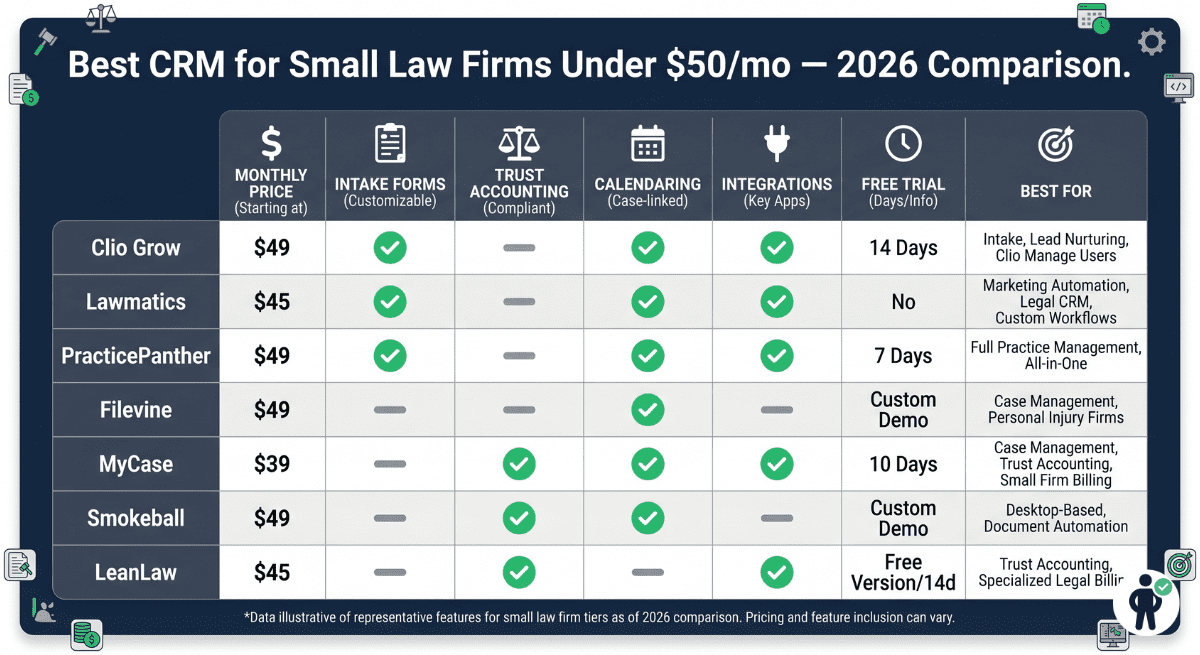
| CRM | Monthly Cost | Intake Forms | Trust Accounting | Calendaring | Integrations | Free Trial | Best For |
|---|---|---|---|---|---|---|---|
| Clio Grow | $36/user | ✅ Advanced | Add-on | ✅ Yes | ✅ 200+ | 7 days | Solo intake focus |
| Lawmatics | $49/mo | ✅ AI-powered | Integration | ✅ Yes | ✅ 500+ | 14 days | PI / Family law |
| PracticePanther | $49 flat | ✅ Standard | ✅ Built-in | ✅ Yes | ✅ 50+ | 30 days | Multi-attorney value |
| Filevine Express | $39/user | ✅ Standard | Add-on | ✅ Yes | ✅ 30+ | 14 days | PI / Criminal defense |
| MyCase | $39/user | ✅ Basic | ✅ Built-in | ✅ Yes | ✅ QuickBooks | 30 days | General practice solo |
| Smokeball Bill | $45/user | ❌ Limited | ✅ Basic | ✅ Court rules | ✅ MS Office | 7 days | Auto time-capture |
| LeanLaw | $39+QB | ❌ Minimal | ✅ Advanced | ❌ No | ✅ QuickBooks | 30 days | Accounting-first firms |
Law Firm CRM Must-Have Features Explained
Intake Conversion (65% Average Lift): The most measurable ROI from a legal CRM comes from automating the gap between a prospect submitting an inquiry and your firm responding. Studies across legal CRM platforms consistently show that automated intake sequences — immediate confirmation, scheduled follow-ups, and streamlined consultation booking — lift consultation conversion rates by an average of 65% compared to manual phone and email follow-up. For a firm that books 10 consultations per month, this means 6–7 additional consultations monthly from the same lead volume.
Conflict Checks: Every attorney has an ethical obligation to run conflict-of-interest checks before taking on a new client. In a manual system, this means searching through existing client records, adverse party lists, and matter files — a process that is time-consuming and prone to human error. A CRM with automated conflict checking cross-references the new client’s name against your entire database in seconds, generating a formal conflict report that can be saved to the file.
IOLTA Compliance: Law firms that handle client funds must maintain IOLTA (Interest on Lawyers’ Trust Accounts) compliant trust accounting. The specific requirements — separate ledgers per client, no commingling of client and firm funds, regular three-way reconciliation — are complex enough that non-compliance is a leading cause of bar disciplinary action. A CRM with built-in IOLTA accounting eliminates the most common trust accounting errors.
Matter Stages: A matter stage pipeline tracks where each active case sits in its lifecycle — from initial consultation through active representation to final resolution and file closing. Attorneys with 30+ active matters rely on matter stages to identify cases that need attention, approaching deadlines, and stalled client communications.
Client Portal Security: All platforms reviewed here offer encrypted client portals for document sharing, messaging, and billing — but security standards vary. Look for AES-256 encryption, two-factor authentication, and access logs showing exactly who viewed which documents and when.
Pricing Breakdown Table (2026 Rates)
| CRM | Starter / Base | Standard / Growth | Billing Model | Multi-User Discount |
|---|---|---|---|---|
| Clio Grow | $36/user/mo | $65/user/mo | Annual only for base rate | None — per user |
| Lawmatics | $49/mo base | $79/mo | Monthly or annual | Bundled pricing available |
| PracticePanther | $49/mo flat | $59/mo flat | Monthly (unlimited users) | N/A — unlimited seats |
| Filevine Express | $39/user/mo | $59/user/mo | Annual billing | 5+ users: negotiated |
| MyCase | $39/user/mo | $59/user/mo | Monthly or annual | 10% annual discount |
| Smokeball Bill | $45/user/mo | $129/user/mo (Boost) | Monthly per user | Volume pricing at 5+ |
| LeanLaw | $39/user/mo | $59/user/mo | + QuickBooks required | 5+ users: contact sales |
Implementation Checklist: 7-Day CRM Switch for Small Firms
- Day 1 Export all client and matter data from your existing system (Clio, MyCase, spreadsheets). Most platforms provide CSV export. Verify the export includes: client names, contact info, matter type, status, and responsible attorney.
- Day 2 Import client data into new CRM using the import wizard. Map your existing fields to the new CRM’s field structure. Flag any data that did not import correctly for manual entry.
- Day 3 Build intake forms for your top 2–3 practice areas. Test each form end-to-end: submit a test lead, verify it appears in your pipeline, and confirm automated follow-up triggers correctly.
- Day 4 Configure automated intake sequences. Set up: immediate confirmation email, 24-hour follow-up if no response, 72-hour follow-up with scheduling link. Test each trigger with a test submission.
- Day 5 Set up integrations: Google Calendar or Outlook sync, email sync, and any third-party tools (QuickBooks, e-signature). Verify that events and contacts sync bidirectionally.
- Day 6 Configure trust accounting settings if applicable: connect bank accounts, set up client ledgers for active retainer clients, and verify reconciliation balances match your current records.
- Day 7 Launch client portal: send portal invitations to all active clients, verify document sharing works, and embed intake forms on your website. Run a full end-to-end test: new lead → intake form → pipeline → consultation booking.
Security & Compliance for Law Firm CRMs
| Security Standard | Clio Grow | Lawmatics | PracticePanther | MyCase | Why It Matters |
|---|---|---|---|---|---|
| SOC 2 Type II | ✅ | ✅ | ✅ | ✅ | Annual third-party security audit |
| HIPAA BAA | ✅ | ✅ | ✅ | ✅ | Required for health-related matters |
| AES-256 Encryption | ✅ | ✅ | ✅ | ✅ | Military-grade data encryption |
| Two-Factor Auth | ✅ | ✅ | ✅ | ✅ | Protects against credential theft |
| 7-Year Data Retention | ✅ | ✅ | ✅ | ✅ | Meets most bar retention rules |
| IOLTA Compliance | Add-on | Integration | ✅ Built-in | ✅ Built-in | Trust accounting bar requirement |
All seven platforms reviewed maintain attorney-client privilege data handling policies, meaning client data is not shared with third parties, not used for advertising, and is isolated from other tenants on the platform. Verify that any CRM you adopt provides a signed Business Associate Agreement (BAA) if your practice handles any health-related client information — this is required under HIPAA regardless of whether your primary focus is health law.
Frequently Asked Questions (FAQ)
Q1: What’s the best CRM for solo law firms under $50?
Clio Grow at $36/user/month is the best CRM for solo law firms under $50/month in 2026. It combines the strongest intake automation in the category (65% average conversion lift), seamless Microsoft 365 and Google Workspace integration, an intuitive pipeline interface, and the backing of Clio’s industry-leading legal software ecosystem. For a solo attorney focused primarily on client acquisition and intake management rather than full practice management, Clio Grow’s Starter plan delivers more law-specific features per dollar than any competitor in this price range. If you also need billing and time tracking in the same platform, MyCase at $39/user/month is the best all-in-one solo solution.
Q2: Does PracticePanther include trust accounting?
Yes — PracticePanther includes full IOLTA-compliant trust accounting at the base $49/month flat price. This includes client trust ledgers, three-way bank reconciliation, earned fee transfer management, and audit-ready reporting. This is one of PracticePanther’s most significant advantages over Clio Grow (where trust accounting requires upgrading to Clio Manage at $69/user/month) and Lawmatics (where trust accounting requires a third-party integration). For a 3-5 attorney firm that needs trust accounting, PracticePanther’s unlimited-user flat pricing with built-in trust features represents the best total value in this category.
Q3: Can I import clients from Clio to Lawmatics?
Yes — you can import clients from Clio into Lawmatics, though it requires an intermediate step. Export your Clio contacts and matters as CSV files (Clio: Settings → Data Exports → Contacts/Matters). Lawmatics accepts standard CSV imports with field mapping for name, email, phone, matter type, and contact status. Alternatively, Lawmatics connects to Clio via Zapier, enabling a semi-automated sync of active leads and contacts without a manual CSV process. Note that matter files, documents, and billing history from Clio do not transfer to Lawmatics — Lawmatics is a CRM and intake tool, not a full practice management platform, so document and billing history would need to remain in Clio or be migrated to a separate practice management system.
Q4: Which CRM has the best intake forms for personal injury?
Lawmatics has the best intake forms for personal injury practices under $50/month. Its AI-assisted intake builder dynamically adjusts questions based on the injury type selected — an auto accident intake shows different conditional fields than a slip-and-fall intake, for example. Lawmatics also includes pre-built PI intake templates covering incident details, medical treatment history, insurance information, and loss-of-income documentation. The multi-channel follow-up sequences (email + SMS simultaneously) are particularly effective for PI leads, who often research multiple firms before committing to a consultation. Filevine Express is the runner-up for PI intake, with its matter-centric pipeline and document automation being well-suited to the document-heavy nature of personal injury case management.
Q5: Is there a truly unlimited user CRM under $50/mo?
PracticePanther at $49/month flat is the only truly unlimited-user CRM under $50/month in the legal software category. Every other platform reviewed here charges per user — meaning a 5-attorney firm would pay $180–$245/month at competitors vs. $49/month at PracticePanther. The unlimited-user model includes all attorneys, paralegals, legal assistants, and administrative staff under the same flat fee. The trade-off is that PracticePanther’s intake automation is less sophisticated than Clio Grow or Lawmatics — but for a growing firm focused on value, the per-user savings at 3+ attorneys more than compensate for this gap.
Final Rankings: Choose Your Perfect Law Firm CRM
Best intake automation, pipeline tracking, and legal ecosystem integration. Ideal for solo attorneys prioritizing client acquisition and consultation conversion.
Try Free 7 Days →Unlimited users, built-in trust accounting, full billing and time tracking. Best total value for 3+ attorney firms and anyone needing IOLTA compliance.
Try Free 30 Days →AI-powered intake forms, multi-channel nurture sequences, and 500+ integrations. Best for PI and family law firms prioritizing marketing automation.
Try Free 14 Days →