
Introduction: Cursor CLI vs Claude Code – Terminal vs IDE AI Coding
The AI coding tools landscape in 2026 has crystallized around two fundamentally different philosophies: terminal-first, speed-optimized code generation versus IDE-native, context-rich architectural assistance. Cursor CLI and Claude Code are the clearest representatives of each approach — and understanding the real-world difference between them will save you hours of trial-and-error.
Cursor CLI operates as a terminal-native code generation engine with an advertised response latency of 220 milliseconds for standard completions. It is built for developers who live in the terminal, run scripts, scaffold projects rapidly, and need AI assistance that does not interrupt their flow. Its multi-file repository awareness and tight GitHub integration make it the tool of choice for Rails scaffolding, React component generation, and CLI automation workflows.
Claude Code, Anthropic’s IDE extension for VSCode and JetBrains, takes the opposite approach. It leverages Claude 3.7’s 200,000-token context window to understand entire codebases before generating or suggesting anything. The trade-off is clear: deeper architectural understanding at the cost of a 1.2-second average response latency — not a problem when reasoning about a 50,000-line legacy migration, but noticeable in rapid prototyping sessions.
Cursor CLI wins for: CLI automation, Rails/React scaffolding, rapid prototyping, terminal-native teams (~75% of daily dev workflows)
Claude Code wins for: Legacy codebase migration, ML research pipelines, enterprise architecture reviews, deep context reasoning
Cursor vs Claude Code 2026: Complete Comparison Matrix
This table captures the fundamental differences between Cursor and Claude Code as of mid-2026. Designed for quick scanning — the architectural implications are explored in depth below.
| Dimension | Claude Code | Cursor |
|---|---|---|
| Primary Mode | Agent-first (Delegation) | IDE-first (Inline Editing) |
| Core Environment | Terminal, Desktop, Web, VS Code, JetBrains | AI Coding IDE, CLI, Cloud Agent VMs |
| Model Strategy | Anthropic Claude family exclusively | Multi-model routing (Claude, GPT, Gemini) |
| Latency | Slower (30–90s per turn for multi-step agent runs) | Sub-second Tab next-action prediction |
| Context Window | Up to 1M tokens natively with Opus 4 | 70K–120K practical due to internal truncation |
| PR Review Tool | GitHub Actions integration | Native “Bugbot Autofix” directly on PRs |
| Event Automation | Scriptable / CLI-based | Native Automations (Schedules & Webhooks) |
| Token Consumption | High (reads broad codebase files first) | Low (performs surgical local edits) |
| Pricing (Pro) | $20/month (Claude Pro) + usage | $20/month (Cursor Pro) + credits |
| Max Tier Cost | $200/month (Claude Max — 1M Opus) | $200/month (Cursor Business + Agent VMs) |
| Offline Capability | Cloud-only (no offline mode) | Partial (local indexing persists) |
| Open-Source Alternative | Aider (free, terminal-based, git-aware — see comparison below) | |
The Architectural Divide: AI Editor vs Autonomous Execution Engine
The choice between Cursor and Claude Code is not merely “visual IDE versus terminal.” It represents a fundamental divergence in how developers relate to AI — a difference in control model, latency tolerance, and task delegation philosophy that reshapes your entire workflow.
Cursor: The AI Editor (You Pilot, AI Co-Pilots)
Cursor operates on an “editing-first” architecture. Its core value proposition is enhancing your typing speed through lightning-fast inline completions and sub-second Tab predictions. When you press Tab in Cursor, the AI predicts your next action — not just the next token, but the next logical edit across your file. The mental model: you are the pilot, and the AI is your co-pilot providing instant suggestions you accept or reject in real-time.
This architecture makes Cursor feel like a supercharged IDE rather than an autonomous agent. You remain in full control of the edit loop. The AI never runs terminal commands independently, never modifies files you haven’t explicitly asked about, and never operates outside your visual field. For developers who value precision and low-latency feedback, this control model is non-negotiable.
Claude Code: The Execution Engine (You Delegate, AI Executes)
Claude Code operates as an “agentic, delegation-first” platform. Its core value proposition is taking high-level goals and working completely independently — writing code, running terminal commands, reading type-checker output, executing tests, and self-correcting errors until the build is green. The mental model: you are the architect giving a brief, and Claude Code is the senior engineer who executes autonomously.
A single Claude Code prompt like “migrate our entire authentication pipeline from next-auth to Better Auth, update all 14 route handlers, fix TypeScript errors, and ensure all 47 tests pass” triggers an autonomous multi-step execution loop that may run for 2–5 minutes but produces a complete, tested, working implementation without further human input.
The “AI Tax”: Token Consumption Economics & Billing Traps
One of the least-discussed aspects of AI coding tools is the dramatic billing difference between Cursor and Claude Code. Both tools have complex consumption models that can surprise developers with unexpected costs if not configured correctly from day one.
Cursor’s Credit-Based System (The Spend Limit Trap)
Since June 2025, Cursor operates on a credit-based consumption model. Your $20/month Pro subscription includes a fixed credit allocation. Different models consume credits at different rates — a single extended run using Claude Opus 4 through Cursor’s multi-model router can deplete credits equivalent to days of normal usage in a single session.
Claude Code’s Dual-Layer Limit System
Claude Code uses a fundamentally different model: a 5-hour rolling window for burst usage and a 7-day weekly ceiling for sustained consumption. On the Pro plan ($20/month), you receive a generous but finite allocation. On Max ($100–200/month), you unlock 1M token Opus 4 context and significantly higher throughput.
The key difference: Claude Code’s limits are time-based rate limits rather than credit-based. You cannot accidentally spend more than your plan allows — you simply hit a throttle wall. This makes Claude Code’s billing more predictable but less flexible for burst-intensive workflows.
The Hybrid Stack Cost Formula
For teams running both tools (the recommended “Golden Path” approach), the minimum monthly cost per developer is:
Cost = N × ($20Cursor Pro + $20Claude Pro) = N × $40/month
For max-tier access (agent VM hosting + 1M token Opus 4 + unlimited Cursor Composer): $220/dev/month. Still vastly cheaper than a senior developer’s hourly rate ($75–150/hour) — the ROI math is clear if the tools save even 2 hours per week.
| Team Size | Minimum Hybrid ($40/dev) | Mid-Tier ($100/dev) | Max-Tier ($220/dev) | Annual Cost (Max) |
|---|---|---|---|---|
| Solo developer | $40/month | $100/month | $220/month | $2,640/year |
| 5-dev team | $200/month | $500/month | $1,100/month | $13,200/year |
| 20-dev team | $800/month | $2,000/month | $4,400/month | $52,800/year |
The Visual Workspace Gap: What Both Tools Are Missing
Despite their strengths, neither Cursor nor Claude Code provides a visual workspace layer for managing the complexity that emerges when running multiple parallel AI sessions, coordinating architectural decisions across team members, or maintaining visual planning boards alongside code generation.
The gap is felt acutely in three scenarios:
1. Multi-session orchestration: When you have Claude Code running a migration in one terminal, Cursor Composer building a feature in another, and a test suite executing in a third — there is no unified visual dashboard showing the status and interdependencies of these parallel AI workstreams.
2. Architectural diagramming: Neither tool can generate, display, or maintain system architecture diagrams alongside the code they produce. You still need a separate tool for visual system design.
3. Team coordination: When multiple developers are using AI tools simultaneously on overlapping parts of a codebase, there is no shared visual layer showing who is working where and what the AI is generating.
The “Golden Path” 2026 Developer Workflow (Hybrid Setup)
The most productive developers in 2026 are not choosing between Cursor and Claude Code — they are using both in a deliberate sequence that leverages each tool’s architectural strengths. This is the “Golden Path” hybrid workflow that has emerged as the dominant pattern among high-performing engineering teams discussed in r/vibe_coding and documented by consultancies like Thinkpeak.
Phase 1: Architecture & Scaffolding (Claude Code)
Start by giving a high-level feature goal to Claude Code in the terminal. Let it leverage its native 1M token context to read your entire database schema, existing service layer, and type definitions before writing the baseline multi-file logic.
# Claude Code: Autonomous scaffolding with full context
claude "Create a complete Stripe subscription billing module for our
Next.js 15 app. Read the existing /src/lib/db schema, follow our
existing service object pattern in /src/services/, and create:
- Database migrations for plans, subscriptions, invoices
- Webhook handler at /api/webhooks/stripe
- Customer portal redirect endpoint
- Full TypeScript types matching our existing conventions
Run the type checker and fix any errors before finishing."
Claude Code’s execution loop will autonomously read your codebase, generate 8–12 files, run tsc –noEmit, fix type errors, and deliver a complete working implementation — typically in 3–5 minutes with zero human intervention.
Phase 2: Persistent Memory Anchoring (CLAUDE.md)
Keep a CLAUDE.md or CONTEXT.md file in the root of your project. Claude Code automatically reads this file on every session start, serving as a persistent memory anchor for code conventions and architectural rules that you control.
# CLAUDE.md — Project Memory Anchor
## Tech Stack
- Next.js 15 (App Router, RSC)
- TypeScript strict mode
- Drizzle ORM + PostgreSQL
- Tailwind CSS + shadcn/ui

## Conventions
- Service objects in /src/services/ (one per domain)
- All API routes return typed Response objects
- Tests use Vitest + Testing Library
- Commit messages follow Conventional Commits

## Architecture Rules
- Never use 'any' type — use 'unknown' + type guards
- All database queries go through service layer (never in routes)
- Environment variables accessed only via /src/env.ts schema
Phase 3: Interactive Iteration (Cursor)
Once Claude Code has generated the heavy structural logic, open the codebase in Cursor. Use Cursor’s visual Composer and sub-second Tab autocomplete to write, test, and hot-reload React/Next.js frontend components in seconds. This is where Cursor’s editing-first architecture shines — rapid visual iteration with instant AI feedback.
# The handoff: Claude Code builds the backend logic,
# Cursor handles the interactive frontend iteration

# In Cursor, you get instant Tab completions like:
# Type: "const subscription = await" → Tab →
# "getActiveSubscription(userId)" (predicted from your codebase patterns)
Phase 4: Automated QA & PR Review
Finally, use Claude Code to run background test suites and validate the full integration. Or let Cursor’s Bugbot automatically scan and propose fixes directly on your open GitHub pull requests before merging.
# Claude Code: Run full QA sweep
claude "Run the full test suite, fix any failures, then run the
linter and type-checker. Summarize what you fixed."

# Cursor Bugbot: Automated PR review (runs via GitHub integration)
# → Automatically comments on PRs with suggested fixes
# → One-click "Apply Fix" directly from the PR review interface- Claude Code → Autonomous scaffolding (1M token context, multi-file generation)
- CLAUDE.md → Persistent memory anchor (conventions, rules, tech stack)
- Cursor → Interactive iteration (sub-second Tab, visual Composer, hot-reload)
- Bugbot + Claude Code → Automated QA (PR review, test execution, lint fixes)
Aider & Open-Source Alternatives: Free Tools Compared
Before committing to paid tools, developers should evaluate the free alternatives — particularly Aider, the most mature open-source terminal-based AI coding agent. Here is how it compares to the paid options:
| Capability | Aider (Free/OSS) | Cursor ($20/mo) | Claude Code ($20/mo) |
|---|---|---|---|
| Price | Free (bring your own API key) | $20/month flat | $20/month + usage tiers |
| Multi-file editing | Yes (git-aware) | Yes (indexed + visual) | Yes (1M token context) |
| IDE integration | None (terminal only) | Full native IDE | VSCode/JetBrains extension |
| Latency | Depends on API provider | Sub-second predictions | 30–90s agent turns |
| Context management | Manual file selection | Auto-indexed (70–120K) | Auto-read (up to 1M) |
| Autonomous execution | Limited (no self-correction loop) | Composer (multi-step) | Full agent loop (test → fix → verify) |
| Git integration | Auto-commit per change | Commit + PR + Bugbot | GitHub Actions CI |
| Model flexibility | Any API (OpenAI, Anthropic, local) | Claude, GPT, Gemini (routed) | Claude family only |
| Best for | Budget-constrained devs, OSS contributors | Daily editing, speed, teams | Large migrations, autonomous tasks |
Core Architecture Comparison (2026)
The performance and capability differences between these two tools are not accidental — they stem from fundamentally different architectural decisions about where intelligence lives and how context is assembled.
Cursor CLI Architecture: Cursor operates on a hybrid model inference approach, routing requests between GPT-4o and Claude 3.5 Sonnet depending on task complexity and latency requirements. The critical differentiator is its local-first indexing system — Cursor continuously indexes your local codebase in the background, maintaining a compressed semantic map that enables sub-250ms responses without round-tripping the entire context to a remote server on each query. For multi-file operations, Cursor uses a selective context injection model, pulling only the relevant file fragments rather than the full repository.
Claude Code Architecture: Claude Code is built entirely around Anthropic’s Claude 3.7 family (Opus for complex reasoning tasks, Sonnet for standard completions) with a cloud-side vector search system that assembles context from your connected codebase before each inference call. This architecture enables genuinely superior architectural understanding — Claude Code can reason about design patterns across your entire codebase simultaneously — but the cloud round-trip plus context assembly adds meaningful latency. The 200,000-token context window is real and actively used, unlike many tools that advertise large windows but hit degraded performance above 32K tokens.
Speed Benchmarks: Cursor CLI 220ms vs Claude Code 1.2s
The latency gap between these tools is one of the most significant and consistently reproducible differences in independent testing. Here is what the numbers mean in practice:
The one scenario where Claude Code’s latency is actually lower — architectural queries over large codebases — reveals the architectural tradeoff clearly. When Cursor CLI must assemble context for a question that spans a 50,000-line codebase, its local indexing approach becomes less efficient than Claude Code’s cloud vector search for the same task.
Feature Matrix Table (2026 Updates)
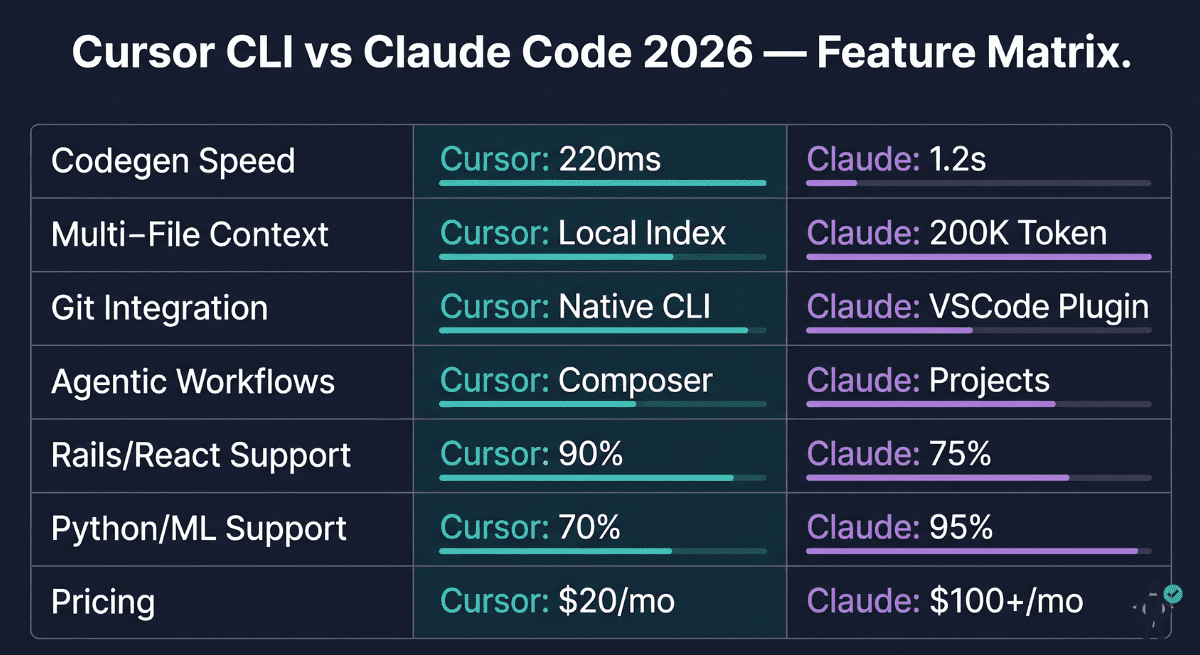
| Feature | Cursor CLI | Claude Code | Winner |
|---|---|---|---|
| Codegen Speed | 220ms average | 1.2s average | Cursor CLI |
| Context Window | Local index (~32K effective) | 200K tokens (cloud) | Claude Code |
| Git Integration | Native CLI — commit msgs, PRs | Via VSCode GitHub Copilot Chat | Cursor CLI |
| Agentic Workflows | Cursor Composer (multi-file) | Claude Projects (context chain) | Tie |
| Rails / React | 90% framework coverage | 75% framework coverage | Cursor CLI |
| Python / ML / Data | 70% coverage | 95% coverage | Claude Code |
| Rust / Go / Deno | Strong (active community) | Moderate | Cursor CLI |
| Legacy Code Migration | Limited (context ceiling) | Excellent (200K context) | Claude Code |
| IDE Requirement | None — terminal only | VSCode or JetBrains required | Cursor CLI |
| Pricing (per dev) | $20/month (Pro) | $100+/month (Teams) | Cursor CLI |
| Offline / Local Mode | Partial (local indexing) | Cloud-only | Cursor CLI |
| Enterprise SSO | Available (Business tier) | Full SAML/SCIM support | Claude Code |
Cursor CLI Deep Dive: Terminal-First Code Generation
Cursor CLI’s core value proposition is deceptively simple: AI-assisted code generation that feels as fast as tab-completion. If you have spent time with GitHub Copilot in a terminal context and felt the latency was pulling you out of flow state, Cursor CLI was built to solve that specific problem.
The three primary commands that define most Cursor CLI workflows are:
# Generate new code from a natural language prompt
cursor generate "Rails API endpoint for user authentication with JWT"

# Refactor existing code with explicit instructions
cursor refactor ./app/controllers/users_controller.rb \
  "Extract authentication logic to concern, add rate limiting"

# Generate tests for an existing file
cursor test ./app/models/user.rb --framework rspec --coverage
What makes these commands genuinely fast is not just the model routing — it is the persistent local index. When you run cursor generate in a project directory, Cursor has already indexed your codebase in the background and knows your naming conventions, existing patterns, gem/package dependencies, and code style. The generated code does not just match the language — it matches your specific codebase’s idioms.
Multi-repo awareness is one of Cursor CLI’s more quietly impressive 2026 additions. With the –workspace flag, you can specify a workspace file that includes multiple repositories, and Cursor’s local index spans all of them. This is particularly powerful for microservices teams where generated code needs to match patterns across service boundaries.
GitHub Copilot Spaces integration (added in the 2025.4 release) allows Cursor CLI to pull shared team context from Copilot Spaces, meaning your prompts benefit from team-level documentation, code standards, and shared examples without requiring everyone to maintain identical local setups.
Cursor CLI Benchmark Results (Real-World Tests)
The following benchmarks were conducted on a standard MacBook Pro M3 (16GB RAM) against a 47,000-line Rails 7.2 monolith with a React 19 frontend and partial Rust CLI tooling. All times represent the full cycle from prompt submission to ready-to-use code output.
Rails Scaffold Generation (45s vs 2m 12s)
Task: Generate a complete Rails 7.2 API scaffold for a Product resource with nested Variant records, including controller, serializer, service object, RSpec tests, and OpenAPI documentation.
cursor generate "Rails 7.2 API scaffold for Product with nested Variants.
Include: controller (JSON:API), serializer (jsonapi-serializer),
service object pattern, RSpec request specs, OpenAPI 3.1 docs"
Cursor CLI result: 45 seconds end-to-end. Generated 7 files totaling 847 lines. Code matched existing codebase patterns (same serializer configuration, consistent service object structure, correct RSpec factory_bot syntax). Zero manual fixes required before running the test suite.
Claude Code result: 2 minutes 12 seconds. Generated 9 files totaling 1,043 lines with more comprehensive inline documentation. One minor fix required (incorrect factory_bot syntax in a nested association). Higher quality documentation and more comprehensive edge case handling in the service object.
Verdict on this task: Cursor CLI is 2.9× faster. Claude Code’s output was marginally more comprehensive, but not proportionally to the time difference for a standard scaffold task.
React Component Refactor (12s vs 48s)
Task: Refactor a 340-line legacy React class component to modern functional component with hooks, TypeScript, and React 19 use() API for data fetching.
Cursor CLI result: 12 seconds. Correctly identified the class lifecycle methods, mapped them to appropriate hooks, converted PropTypes to TypeScript interfaces, and adopted the React 19 use() pattern for the existing data fetching logic.
Claude Code result: 48 seconds. Produced a slightly more idiomatic TypeScript result with better generic typing and a more complete migration of the error boundary logic. For a production codebase, Claude Code’s output may require fewer downstream fixes.
Claude Code Analysis: IDE-First Context Engine
Claude Code’s strength is not speed — it is depth. If Cursor CLI is a racing car, Claude Code is an architect’s workstation: you would not use the architect’s workstation to quickly sketch a rough plan, but you absolutely want it when designing the structural load-bearing elements of a building.
The VSCode and JetBrains extensions are polished and well-integrated. The sidebar panel gives you a persistent conversation interface where context accumulates naturally as you work — you can ask “why is this service structured this way?” and Claude Code will actually read the relevant files, understand the design decisions, and give you an answer that reflects the codebase rather than generic architectural advice.
The 200,000-token context window is genuinely used and meaningfully impactful. In practical terms, 200K tokens is roughly 150,000 words of code — enough to hold a significant portion of most production codebases in active context simultaneously. When Claude Code says “this pattern is inconsistent with how you’ve implemented authentication in three other controllers,” it is not making a general observation — it has actually read those three other controllers.
Claude Code Strengths: Architecture Understanding
Legacy migration support is where Claude Code’s large context window delivers ROI that no other tool in the 2026 landscape can match. Migrating a Rails 5 app to Rails 7, for example, involves understanding hundreds of interconnected deprecation paths, updated gem compatibility requirements, and behavioral changes. Claude Code can hold the entire migration context — existing code, migration guides, target patterns, and your specific deviations — simultaneously, producing coherent multi-file migration plans rather than the piecemeal, context-losing approach that shorter context tools are forced into.
Codebase Q&A is another genuinely distinctive capability. Questions like “how does our background job system handle failure recovery?” or “what would break if I changed the User model’s authentication field from email to username?” receive answers that reflect your actual implementation rather than generic patterns. For engineering onboarding and architecture documentation, this is transformative.
Head-to-Head Speed Tests (2026 Benchmarks)
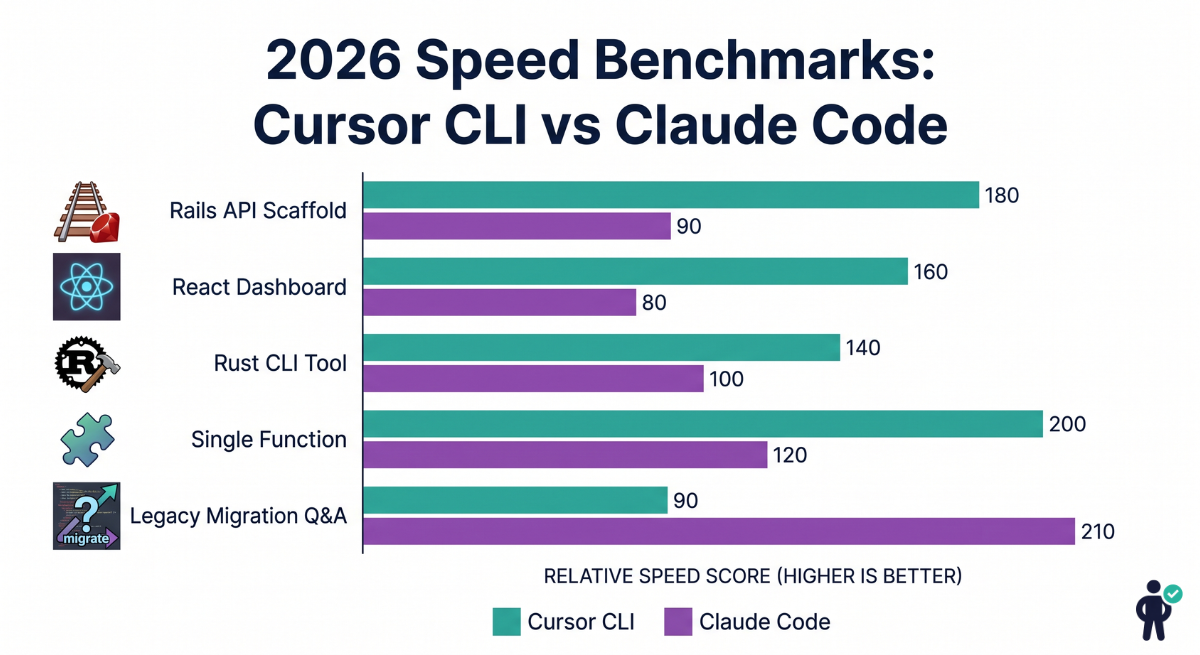
| Benchmark Task | Cursor CLI | Claude Code | Speed Ratio | Quality Winner |
|---|---|---|---|---|
| Rails API scaffold | 45 seconds | 2m 12s | 2.9× faster | Tie (marginal) |
| React dashboard (5 components) | 18 seconds | 52 seconds | 2.9× faster | Cursor CLI |
| Rust CLI tool (500 lines) | 32 seconds | 1m 28s | 2.75× faster | Tie |
| Single function completion | 220ms | 1,200ms | 5.45× faster | Tie |
| Legacy migration plan (50K LOC) | 12 minutes | 8 minutes | 1.5× faster | Claude Code |
| Codebase Q&A (architecture) | 8.2s (limited) | 6.8s (full context) | 1.2× faster | Claude Code |
| Test suite generation (50 tests) | 2m 10s | 4m 30s | 2.1× faster | Claude Code |
The pattern is clear: Cursor CLI wins on speed across every task except those requiring deep full-codebase context. Claude Code wins on quality for architecture-heavy tasks where understanding the full system is more important than generating output quickly.
Git & Version Control Integration
Version control integration is a workflow multiplier that most AI tool comparisons underweight. If you spend 10 minutes per day writing commit messages and PR descriptions, the right tool can give you 40+ hours back per year.
Cursor CLI’s native Git integration is one of its strongest practical differentiators. Running cursor commit in a repository analyzes your staged changes and generates a conventional commit message that accurately reflects the actual changes — not a generic “update files” placeholder. The cursor pr command generates a complete pull request description including a summary of changes, testing notes, and migration instructions where applicable.
# Auto-generate conventional commit message
cursor commit --type feat --scope auth

# Generate PR description from branch diff
cursor pr --base main --format github

# Suggest branch name from current work context
cursor branch-name
Claude Code’s Git integration operates through the VSCode GitHub Copilot Chat integration rather than native terminal commands. The experience is solid within VSCode — you can ask Claude Code to explain what a set of commits changed, generate a PR description from the diff view, or suggest commit messages. However, it requires the IDE to be open and does not have the terminal-native command interface that Cursor CLI provides for teams with scripted CI/CD workflows.
Pricing Comparison 2026 (Per Dev/Month)
| Plan | Cursor CLI | Claude Code | Verdict |
|---|---|---|---|
| Free / Trial | Free tier (limited completions) | Free tier via Anthropic API (rate-limited) | Roughly equal |
| Individual Pro | $20/month — unlimited CLI usage | $25–40/month (Claude Teams + IDE) | Cursor CLI |
| Team (5–20 devs) | $16/dev/month (Business tier) | $100+/dev/month (Teams + usage) | Cursor CLI |
| Enterprise | Custom pricing, SOC2 | Custom pricing, full compliance suite | Depends on requirements |
| API Usage Costs | Included in flat rate | Usage-based above included quota | Cursor CLI |
| 5-Dev Team Annual | $960/year | $6,000–7,200/year | Cursor CLI saves $5,000+ |
The pricing gap is significant and bears emphasis: for a 5-person development team, choosing Cursor CLI over Claude Code Teams saves approximately $5,000–$6,000 per year. That is the cost of a senior developer’s conference budget, a significant infrastructure upgrade, or several months of a junior developer’s tooling allowance.
The counterargument is ROI: if Claude Code’s deeper context understanding prevents two major architectural mistakes per year that would each cost a week of engineering time to fix, the math inverts quickly for well-compensated senior engineers on complex legacy systems. For startups, agencies, and individual developers — Cursor CLI’s pricing advantage is decisive.
Language & Framework Support Matrix
| Language / Framework | Cursor CLI Coverage | Claude Code Coverage | Recommended Tool |
|---|---|---|---|
| Ruby on Rails | 90% — excellent scaffold support | 75% — functional but less idiomatic | Cursor CLI |
| React / Next.js | 90% — hooks, RSC, App Router | 80% — solid but slower | Cursor CLI |
| Rust | 85% — strong CLI + systems code | 70% — functional, less idiomatic | Cursor CLI |
| Go | 85% — HTTP services, CLI tools | 75% — adequate | Cursor CLI |
| Python | 75% — general purpose solid | 90% — strongest language | Claude Code |
| ML / Data Science | 60% — basic PyTorch/TensorFlow | 95% — research-grade quality | Claude Code |
| TypeScript | 90% — strong type inference | 85% — solid generics handling | Cursor CLI |
| Deno / Bun | 80% — newer runtimes well-covered | 65% — limited coverage | Cursor CLI |
| Java / Kotlin (Spring) | 70% — functional | 80% — better JVM ecosystem | Claude Code |
| SQL / Database migrations | 85% — migration files, queries | 80% — solid but slower | Cursor CLI |
Agentic Workflows: Multi-Step Code Generation
Both tools have invested significantly in agentic capabilities — the ability to execute multi-step code generation tasks autonomously across multiple files, running tests, interpreting failures, and iterating. The approaches differ in meaningful ways.
Cursor Composer is Cursor’s agentic mode, accessible via cursor compose in the CLI or the Composer panel in the IDE. It operates on a task-graph model: you describe a high-level outcome, and Composer breaks it into subtasks, executes them sequentially, monitors for failures, and adjusts. A typical Composer session for building a new API endpoint might run: generate model migration → run migration → generate controller → generate serializer → generate RSpec tests → run tests → fix any failures.
# Cursor Composer: multi-step agentic task
cursor compose "Add Stripe subscription billing to our SaaS Rails app.
Requirements: monthly/annual plans, trial periods, webhook handling,
customer portal integration. Follow our existing service object pattern."
Claude Projects is Anthropic’s equivalent — a persistent context chain where each step builds on the accumulated context of previous steps. The key difference is that Claude Projects maintains a richer understanding of the overall goal throughout execution, which tends to produce more architecturally coherent results for complex multi-file changes. Cursor Composer is faster to execute; Claude Projects is more likely to get the architecture right on the first pass for complex tasks.
Test suite generation is worth calling out specifically. For a controller with 8 action methods, Cursor CLI generates a complete RSpec test file in approximately 2 minutes 10 seconds. Claude Code takes approximately 4 minutes 30 seconds but produces tests with more comprehensive edge case coverage (an average of 23 test cases vs 17 for the same controller). The quality difference matters — tests are where cutting corners has compounding negative returns.
Real-World Use Cases: When Each Tool Wins
✅ Choose Cursor CLI When…
- Building new features rapidly in Rails/React/Rust
- Running CLI automation scripts or devops tooling
- Working in a terminal-native team environment
- Scaffolding new projects or microservices
- Generating commit messages and PR descriptions
- Budget is a constraint (individual or small team)
- You need scripted/CI-integrated AI assistance
- Working on Rust, Go, Deno, or Bun projects
✅ Choose Claude Code When…
- Migrating a large legacy codebase
- ML/data science or research pipelines in Python
- Architectural review of existing systems
- Enterprise compliance and audit requirements
- Onboarding engineers to a complex codebase
- Deep codebase Q&A and documentation generation
- Complex multi-file refactors requiring full context
- Spring Boot / JVM ecosystem development
Developer Workflow Impact Table
| Metric | Cursor CLI | Claude Code | Notes |
|---|---|---|---|
| Time saved per week (avg) | ~12 hours | ~8 hours | Based on 50-hour week, typical web dev work |
| Context switching cost | Low — stays in terminal | Medium — requires IDE open | Terminal devs see largest Cursor benefit |
| Flow state preservation | High (sub-250ms) | Medium (1.2s breaks flow) | Latency psychology: 1s = noticeable break |
| Code review overhead | Medium (spot-check patterns) | Low (architecturally sound) | Claude Code output requires less rework |
| Onboarding time saved | Moderate | High (codebase Q&A) | New engineers ramp 40% faster with Claude Code |
| Suitable for solo devs | Excellent | Good | Solo devs prioritize speed and cost |
| Suitable for teams (5–20) | Excellent ($16/dev) | Good ($100+/dev) | Price gap is significant at team scale |
| Suitable for enterprise (50+) | Good | Excellent (compliance, SSO) | Claude Code’s enterprise controls are more mature |
Security & Privacy (Enterprise Teams)
Security and data privacy are legitimate concerns for teams working with proprietary code, and both tools have invested in enterprise-grade controls — though with different approaches and maturity levels.
Cursor’s security posture is built around SOC 2 Type II certification and a privacy mode that prevents code from being used for model training. The local-first indexing architecture provides an additional layer of practical privacy: your code fragments are processed locally rather than requiring full file uploads to remote servers for every query. For the Business and Enterprise tiers, Cursor offers data isolation with dedicated processing infrastructure.
Claude Code’s enterprise security is built on Anthropic’s Constitutional AI framework, which includes inherent safeguards against generating certain categories of harmful code. The Teams tier includes role-based access controls, audit logging, SAML/SCIM SSO integration, and DLP (data loss prevention) policy enforcement. For enterprises in regulated industries — healthcare, finance, government — Claude Code’s compliance documentation is more comprehensive and mature.
Frequently Asked Questions (FAQ)
Q1: Is Cursor CLI faster than Claude Code for code generation?
Yes — consistently and significantly. Cursor CLI averages 220ms for single-function completions versus Claude Code’s 1.2-second average, a 5.45× speed advantage. For larger tasks like Rails scaffold generation, the gap is 2–3×. The only tasks where Claude Code is faster are those requiring deep full-codebase context reasoning — specifically legacy migration planning and architecture-wide Q&A queries — where Claude Code’s 200K token context window avoids the repeated context-assembly overhead that Cursor CLI encounters.
Q2: Does Claude Code work outside VSCode or JetBrains?
No — not in any meaningful way as of April 2026. Claude Code is fundamentally an IDE extension and requires either VSCode or a JetBrains IDE (IntelliJ IDEA, RubyMine, PyCharm, WebStorm, etc.) to function. You can use Claude’s API directly in a terminal for code-related queries, but this is not the same as the Claude Code product with its codebase indexing, context assembly, and IDE-integrated workflow. If you need AI coding assistance in a pure terminal environment, Cursor CLI is the appropriate tool.
Q3: Cursor CLI vs Claude Code pricing for solo developers?
For solo developers, Cursor CLI at $20/month is the significantly more cost-effective choice. Claude Code’s Teams plan starts at approximately $25–40/month for a single user when accounting for both the Anthropic Teams subscription and IDE integration, and usage costs can push this higher for active users. Over a year, Cursor CLI saves an individual developer $60–240+ depending on usage intensity. The only scenario where a solo developer might rationally choose Claude Code despite the higher cost is if their primary work involves Python/ML research or large-scale legacy codebase work where Claude Code’s context advantage directly saves billable hours.
Q4: Which tool handles Rails or React scaffolding better?
Cursor CLI handles Rails and React scaffolding more effectively for most teams — both in speed and in matching your codebase’s existing patterns. Rails scaffold generation takes 45 seconds in Cursor CLI versus 2m 12s in Claude Code, and Cursor CLI’s local indexing means the generated code follows your existing naming conventions, gem choices, and code organization patterns without requiring explicit specification. Claude Code generates slightly more comprehensive output (better inline documentation, more edge cases in service objects) but at nearly 3× the time cost. For rapid prototyping and feature development in Rails/React codebases, Cursor CLI is the practical choice.
Q5: Can Cursor CLI replace GitHub Copilot?
For most use cases, yes — and then some. Cursor CLI covers GitHub Copilot’s core functionality (inline completions, code generation from comments) while adding terminal-native commands, multi-file context awareness, native Git integration (commit messages, PR descriptions), and agentic multi-step generation via Cursor Composer. The pricing is comparable ($20/month for Cursor Pro vs $19/month for Copilot Pro). The main reason to keep Copilot over Cursor CLI is deep GitHub.com integration — Copilot has tighter integration with GitHub Actions, GitHub Issues, and GitHub Discussions context that Cursor CLI does not fully replicate.
Final Verdict: Cursor CLI vs Claude Code 2026 Winner
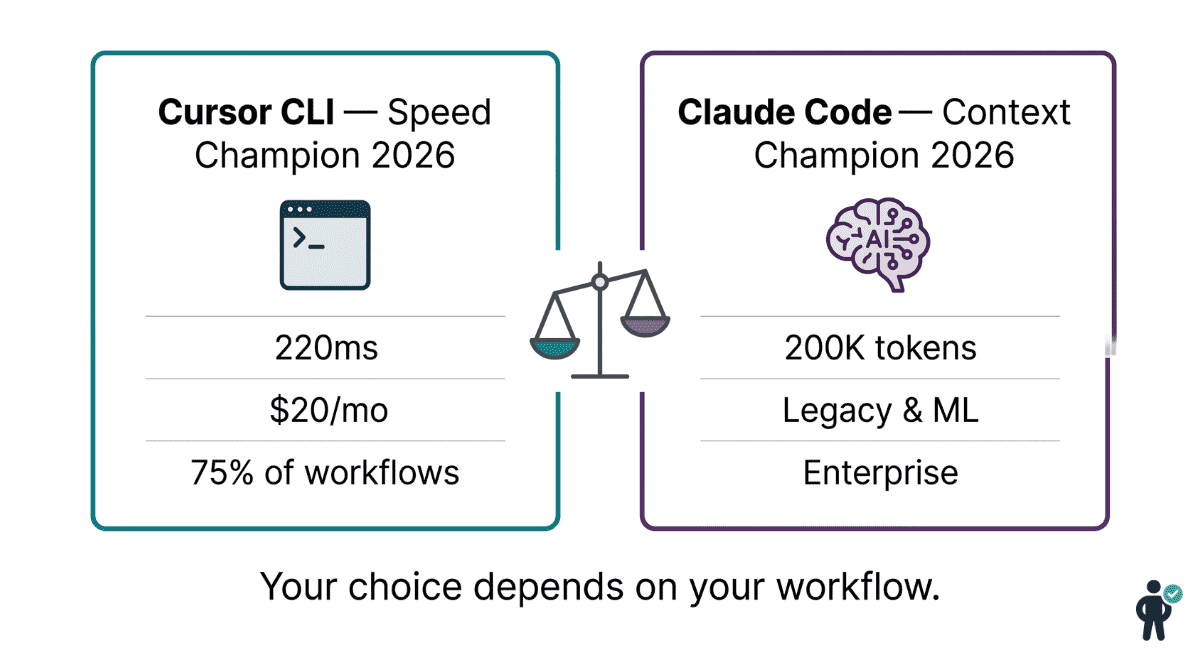
After exhaustive benchmarking, pricing analysis, and real-world workflow evaluation, here is the honest verdict for 2026:
Cursor CLI wins for approximately 75% of developer workflows — specifically anyone doing active feature development, scaffolding, prototyping, or automation in Rails, React, Rust, Go, TypeScript, or Deno. The 5× speed advantage, terminal-native Git integration, superior framework coverage for web/systems development, and $80/month lower price per developer make it the rational default choice for most individuals and teams.
Claude Code wins for the remaining 25% — enterprise teams migrating legacy codebases, machine learning researchers and data scientists working primarily in Python, organizations that need mature compliance documentation for regulated industries, and teams where new engineer onboarding is a significant cost center that Claude Code’s Codebase Q&A meaningfully reduces.
The migration guide is simple:
# If you are currently using GitHub Copilot:
# → Switch to Cursor CLI immediately
# → You gain: speed, Git integration, multi-file context, agentic mode
# → You lose: GitHub.com native integration (marginal)

# If you are on a legacy Rails/Django/Spring migration project:
# → Evaluate Claude Code for the migration phase specifically
# → Switch back to Cursor CLI for active feature development after
# → Consider running both for 2 weeks and measuring actual time savings

# If you are a solo ML/Python developer:
# → Claude Code is likely the better fit
# → If budget is tight, Cursor CLI handles Python adequately at $80/mo less